
Reference No: 24981
(V 02.00.14-00)
Details
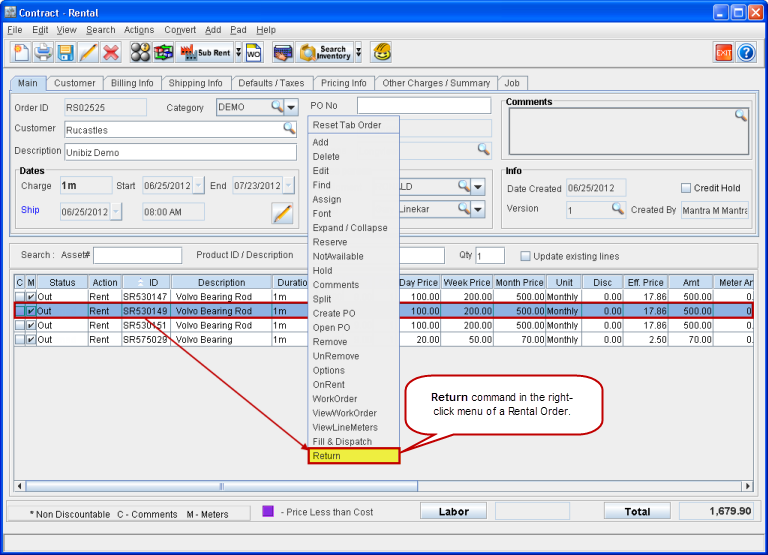
In CR2, the Return command is now provided in the right-click menu. This can be accessed by right-clicking on any of the order item lines in a reservation Rental Order, as shown in Figure 1.0.
Figure 1.0 Return Command in Right-click Menu of Rental Order
The same feature is also provided under the Actions menu > Yard, as Quick Return. This can also be accessed using the keyboard shortcut ALT+K.
This feature can be used to return Serial Items, Non-serial Items, Serial Parts, Non-serial Parts, Serial Kits, and Non-serial Kits in a Rental Order which has status as Out, Overdue, Off-Rent,Sold, or S-Out.
Return Items Dialog Box
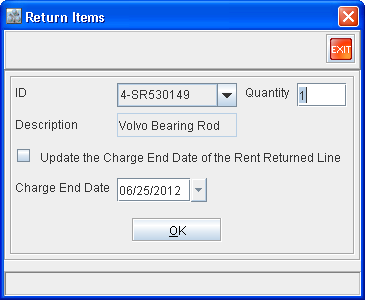
When you select the Return command from the Right-click menu, the Return Items dialog box opens up as shown in Figure 1.1.
Figure 1.1 Return Items Dialog Box
-
If you have selected an order item line with status as either Out, Overdue, Off-Rent, Sold, or S-Out then, the Return Items dialog box opens up with the following populated by default:
-
ID - ID of the Item in the selected order item line.
-
Quantity - Quantity of the Item in the selected order item line.
-
Description - Description of the item in the selected order item line.
-
Charge End Date - Current system date.
-
If you have selected an invalid order line (for example, Blank/Reserved/Serial Kit child/Returned line) then, the Return Items dialog box opens up with all the fields blank except the Charge End Date. The Charge End Date field will be populated with the current system date, by default.
-
By default, the control will be in the Quantity field of the Return Items dialog box.
-
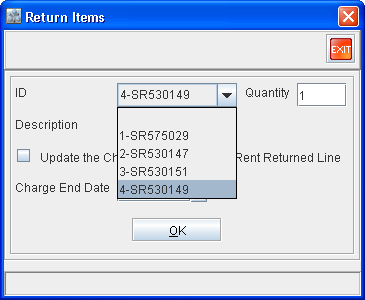
The IDs of the Items which are out on rent on the Rental Order (whose status is presently OUT) will alone be available within the drop-down list in the ID field of the Return Items dialog box, as shown in Figure 1.2. Selecting any of these will update the other fields within the Return Items dialog box with relevant data from that item's order item line.
Figure 1.2 ID Drop-down of Return Items Dialog Box Listing All the Rented Out Items from the Rental Order
-
Non-serial Items, non-serial Parts, and non-serial Kit's child can be partially returned using this feature.
-
When the Sold Item/Parts are returned then the new line will show with the status as Returned and the amount will be negative.