Reference No: 25804
(V 02.00.17-00)
Additional Columns in Pricing Dialog Box of Purchase Assign
Details
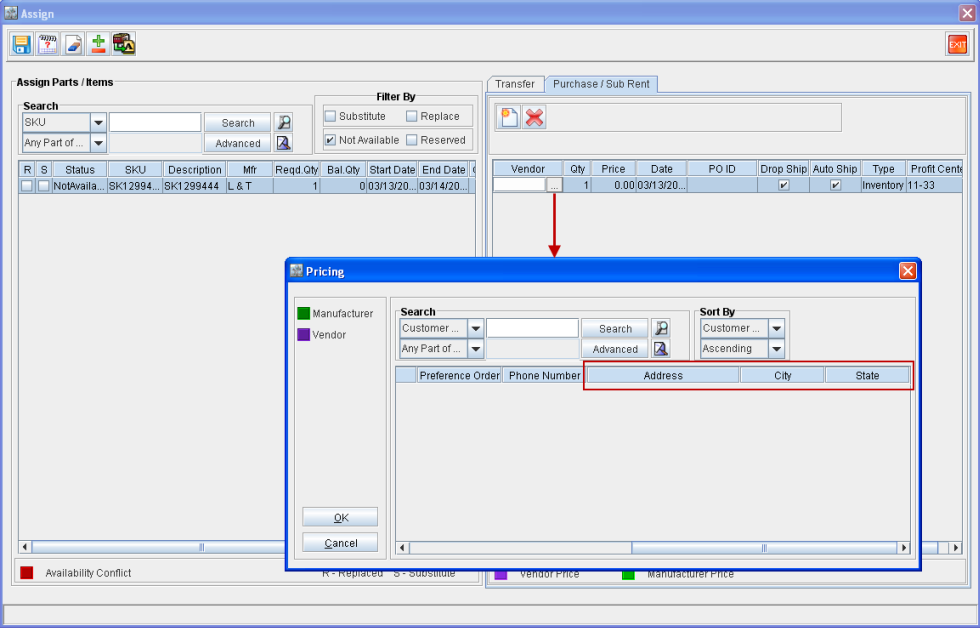
When you choose to Purchase Assign a Not Available Item/Part in an Order, the Assign window is displayed. In the Assign window > Purchase/Sub Rent tab, click the Import button in the Vendor column, the Pricing dialog box is displayed. In the Pricing dialog box additional three columns are provided. They are:
-
Address
-
City
-
State
The values displayed in the above stated columns will be same as the values defined under Address dialog box of the Customer edit window.
Figure 1.0 Additional Columns in Pricing Dialog Box