Reference No: 25470
(V 02.00.16-00)
Details
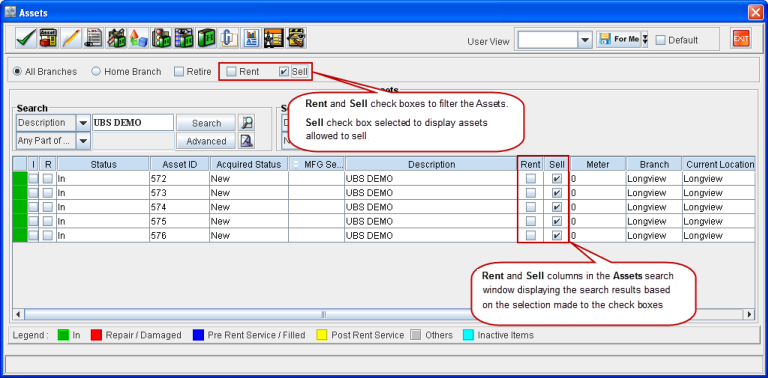
In CR2, while searching for an asset in Accounts > Search > Assets window, the search can be performed based on the selections made to the Rent and Sell check boxes of individual Assets. Two additional columns named Rent and Sell are provided in the Assets search window to display the results based on the selection made.
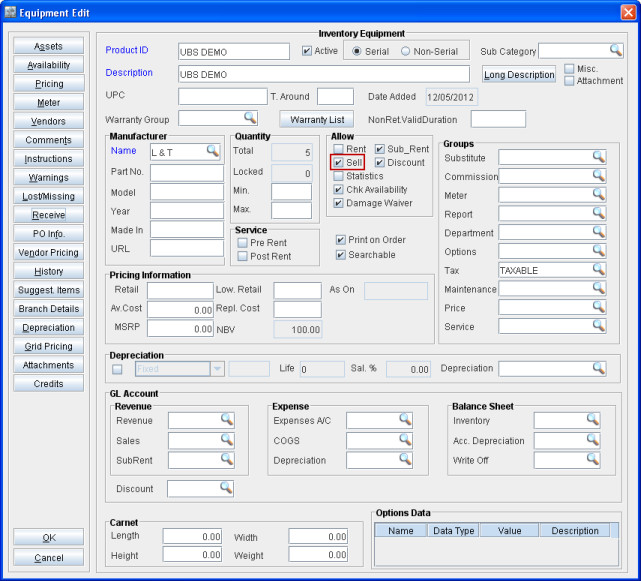
For example, if the check box Sell is selected for an item in the Item Edit window, and when assets are received for the same Item, on performing search in Search > Assets window with the search filter option selected for Sell, the assets allowed to sell will be displayed.
Note: If both the check boxes Rent and Sell are selected to search an asset in the Assets search window, and if the same asset is allowed only for one option (Rent/Sell) the system will not display the search results.
Sample Workflow
-
Define the Item and allow rent/selling.
Figure 1.0 Item Allowed to Sell
-
Perform search for the Asset which is received for the above item with check box Sell selected.
Figure 1.1 Search Performed for Asset Allowed Only to Sell