
Reference: 22089
Details
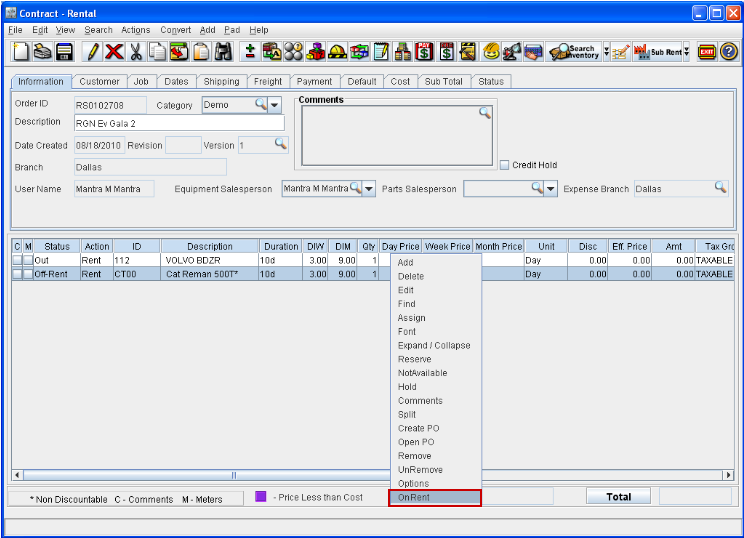
In Cr2, you can change the status of the items which are in Off-Rent status (Items having status 'Out' , for which Pickup order is generated) to Out status using the option On Rent which is present in the Actions menu as well in the right-click menu.
You can change the status of Off-Rent item either selectively or for all the items which are in Off-Rent status using the menu options.
-
The Off-rent items can be selectively changed to OUT Status, by highlighting the item line(s) and following selecting the option Selected Lines from Actions g On Rent sub menu.
-
You can also change all the lines which are having Off-Rent status to OUT status by selecting the option All Lines from Actions g On Rent sub menu or by highlighting all the Off-Rent items and following selecting the option On Rent from the right-click menu.
Figure 1.0 On Rent Option in Actions Menu
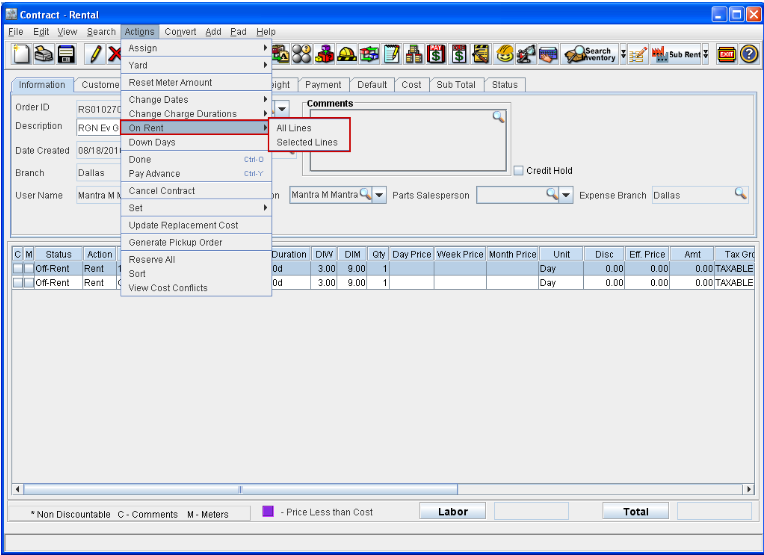
Figure 1.1 On Rent Option in Right-click Menu
Points to Note
-
On changing the Line level status from Off-Rent to Out, system will delete all the Off-Rent details for the item.
-
In the Line level Charge End date will be updated as Current date.