
Reference No: 24164
(V 02.00.09-00)
In CR2, you can return products (items/assets/parts) to vendors using the Return to Vendor feature. A new order type named as Return to Vendor is provided for implementing this feature.
Creating Return to Vendor Orders
A Return to Vendor Order can be created by doing one of the following:
-
Clicking on the Return to Vendor icon from within the PO list window, as shown in Figure 1.0.
Figure 1.0 Creating a Return to Vendor Order from PO List Window

-
Selecting CR2 > Accounts > File menu > New > Return to Vendor.
Figure 1.1 Creating a Return to Vendor Order from Accounts Window
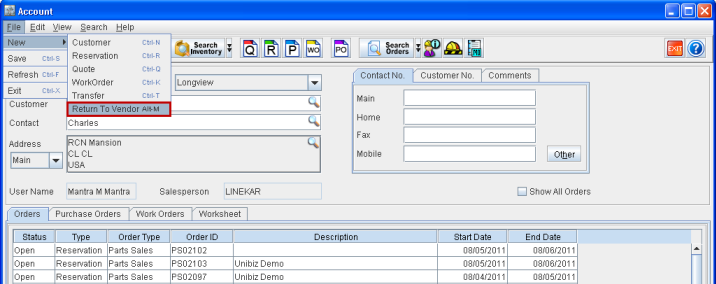
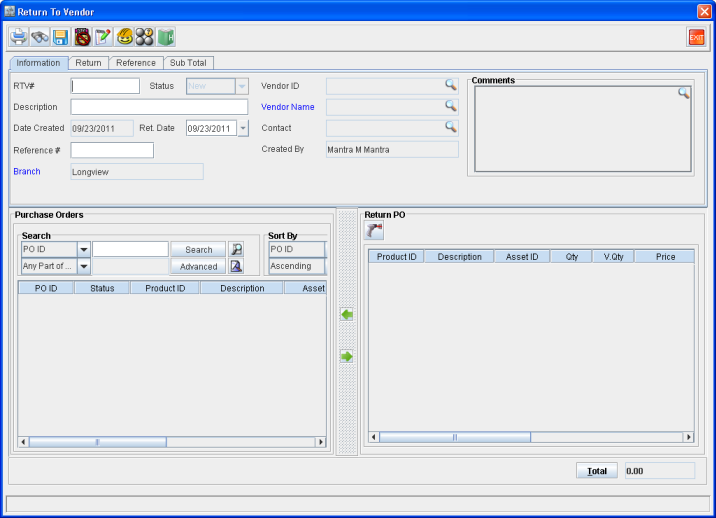
This opens up the Return to Vendor Order window as shown in Figure 1.2.
Figure 1.2 Return to Vendor Order Window
New Column in Purchase Orders
A new read-only column named as Ret. Qty. (Returned Quantity) is added to Purchase Orders, as shown below. This field indicates the quantity of the item/part that was returned. Its value gets updated automatically when an item/part present in a Purchase Order is returned using a Return to Vendor Order.
Accounting Distribution Entries
A new set of accounting distribution entries get created within the Dist.txt file when Voucher, created out of returning item(s)/part(s) using a Return to Vendor Order, is posted in the Great Plains format. The various scenarios that might arise thereof are listed below.
Scenario - 1
Consider that 20 quantities of a part VOE11197983 was received through a Purchase Order to vendor VOLVO-LONGVIEW (200$ per unit cost) and vouchered with cost of 210$ each.
|
Vendor |
PO ID |
Qty |
PO Price |
Voucher Price |
Receive Batch ID |
Voucher ID |
|
VOLVO-LONGVIEW |
PO#001 |
20 |
200 |
210 |
ID001 |
CR3054693 |
On posting, entries in the Dist.txt are as given below:
|
Voucher# |
AccountNum |
Type |
Debit |
Credit |
|
CR3054693 |
1210-01-30-31-00 |
PURCH |
4200.00 |
0.00 |
|
CR3054693 |
2000-00-00-00-00 |
PAY |
0.00 |
4200.00 |
Another 10 quantities are received at 100$ cost.
|
Vendor |
PO ID |
Qty |
PO Price |
Voucher Price |
Receive Batch ID |
Voucher ID |
|
VOLVO-LONGVIEW |
PO#002 |
10 |
100 |
100 |
ID002 |
CR3054694 |
On posting, entries in the Dist.txt are as given below:
|
Voucher# |
AccountNum |
Type |
Debit |
Credit |
|
CR3054694 |
1210-01-30-31-00 |
PURCH |
1000.00 |
0.00 |
|
CR3054694 |
2000-00-00-00-00 |
PAY |
0.00 |
1000.00 |
Another 5 quantities are received at 100$ cost and vouchered with cost of 110$.
|
Vendor |
PO ID |
Qty |
PO Price |
Voucher Price |
Receive Batch ID |
Voucher ID |
|
VOLVO-LONGVIEW |
PO#003 |
5 |
100 |
110 |
ID003 |
CR3054695 |
On posting, entries in the Dist.txt are as given below:
|
Voucher# |
AccountNum |
Type |
Debit |
Credit |
|
CR3054695 |
1210-01-30-31-00 |
PURCH |
550.00 |
0.00 |
|
CR3054695 |
2000-00-00-00-00 |
PAY |
0.00 |
550.00 |
Consider that the quantities received in the first 2 batches are sold on Sale Orders. The first received batch ID001 is used in the Parts Sale Order PS102344 with quantity as 20.
Cost went from inventory was 210*20 = $4200. The distribution entries of AR Invoice are as given below.
|
DocNum |
AccountNum |
Type |
Debit |
Credit |
|
10516407 |
2610-00-00-00-00 |
TAX |
0.00 |
500.00 |
|
10516407 |
3300-01-00-00-00 |
SALE |
0.00 |
4500.00 |
|
10516407 |
5300-01-00-00-00 |
COGS |
4200.00 |
0.00 |
|
10516407 |
1210-01-00-00-00 |
INV |
0.00 |
4200.00 |
|
10516407 |
1111-00-00-00-00 |
RECV |
5000.00 |
0.00 |
Now return 5 quantities of the item received through Purchase Order PO#001 (Batch ID001) of part VOE11197983. Then, distribution entries within the Dist.txt are as shown below.
|
Voucher# |
AccountNum |
Type |
Debit |
Credit |
|
CR00001 |
1210-01-30-31-00 |
PURCH |
0.00 |
1050.00 |
|
CR00001 |
2000-00-00-00-00 |
PAY |
1050.00 |
0.00 |
|
CR00001 |
5300-01-00-00-00 |
COGS |
0.00 |
1050.00 |
|
CR00001 |
1210-01-00-00-00 |
INV |
1050.00 |
0.00 |
|
CR00001 |
5300-01-00-00-00 |
COGS |
550.00 |
0.00 |
|
CR00001 |
1210-01-00-00-00 |
INV |
0.00 |
550.00 |
The COGS entries sent on sale invoice are reversed (for the amount of 1050$). It will be mapped to the available receive lines and those entries are sent (for the amount 550$). These adjustment entries are sent only if we are returning the product lines that were already sold.
Scenario - 2
From scenario-1, select the received batch ID003,instead of ID001, whose contents are still available. Then the Voucher entries within Dist.txt are as shown below:
|
Voucher# |
AccountNum |
Type |
Debit |
Credit |
|
CR00001 |
1210-01-30-31-00 |
PURCH |
0.00 |
550.00 |
|
CR00001 |
2000-00-00-00-00 |
PAY |
550.00 |
0.00 |
Note: COGS reversal entries wont be sent in this case since the item is not sold on any order.
Scenario - 3
If a Misc. Charge is added to a Return to Vendor Order's Voucher then the entries within the Dist.txt are as shown below:
-
Misc. Charge added as a negative amount in the voucher to reflect any additional charges incurred in the process of returning, and that needs to be charged from the vendor.
|
Voucher# |
AccountNum |
Type |
Debit |
Credit |
|
CR367 |
1200-23-00-00-00 |
PURCH |
0 |
50 |
|
CR367 |
7537-23-00000-00 |
MISC |
0 |
20 |
|
CR367 |
2000-00-00-00-00 |
PAY |
50 |
0 |
|
CR367 |
2000-00-00-00-00 |
PAY |
20 |
0 |
-
Misc. Charge added as a positive amount in the voucher to reflect any additional charges incurred by the vendor in the process of returning.
|
Voucher# |
AccountNum |
Type |
Debit |
Credit |
|
CR369 |
1200-23-00-00-00 |
PURCH |
0 |
50 |
|
CR369 |
7537-23-00000-00 |
MISC |
20 |
0 |
|
CR369 |
2000-00-00-00-00 |
PAY |
50 |
0 |
|
CR369 |
2000-00-00-00-00 |
PAY |
0 |
20 |