Reference : 22904
(V 02.00.07-00)
Details
In CR2, while creating periodic billing rental orders, you can view the pricing information (chargeable days and amount charged) in the Pricing Info tab of the Rental Order window. Refer Figure 1.0 for illustration.
Figure 1.0
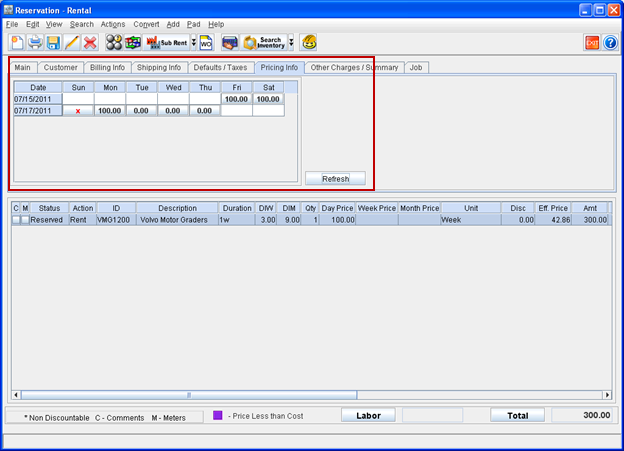
-
The charge details will be displayed in the Pricing Info. tab only for periodic billing rental orders.
-
The Information displayed in the Pricing Info tab will be always dependent on the values for DIW, DIM and Billing Terms
-
On creating a new periodic billing order, system will display the charge details in Pricing Info. tab as blank. The charge details grid can be updated after adding item to the order, either by clicking the Refresh button present in the Pricing Info. tab or by clicking the Total button.
Table 1.0 Charge Details Grid column Information
|
Column |
Description |
|
Date |
Displays the dates from Charge Start Date to Charge End date. |
|
Week Day Columns (Sun, Mon, Tue, Wed, Thu, Fri,Sat) |
The week days column displays the value based on chargeable and non-chargeable status for each day as below Will be displayed as blank, if the day / days present is not between order charge start date to end date. 
Will be displayed as "X", if day/ days are selected as Non-chargeable in configuration. 
See also : Defining Non Chargeable Days for Periodic Billing Orders Total amount charged for a day. 
Will display the value with grey background color, if charged Day/ Days are posted. 
|
Usage Illustration
Pre-requisite
-
In Configuration module > Order Defaults tab > Non Chargeable Days field, set Sunday as Non Chargeable Days.
-
Create an order having the details as given in Table 2.0.
Table 2.0
|
Order |
Charge Duration |
Item |
Qty |
DIW |
DIM |
Duration |
Day Price |
Unit |
|
ORD#1 |
07/15/2011- 07/21/2011 |
VMG1200 |
1 |
3 |
9 |
1w |
100.00 |
Week |
-
System displays the charge details in Pricing Info. tab (refer fig 2.0) by considering the settings given in Table 2.1.
Table 2.1
|
Order Starting Day |
DIW |
Non chargeable days set in configuration |
Duration |
Unit |
|
Friday |
3 |
Sunday |
1w |
Week |
Figure 2.0
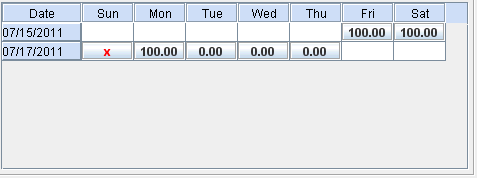
-
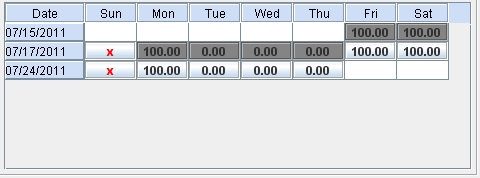
On posting invoice generated for the order, the charge details will be displayed in the Pricing Info Tab as shown in Figure 2.1.
Figure 2.1