
Reference: 21401
(V 02.00.00-00)
Creating Work Orders without Orphan Lines
Details
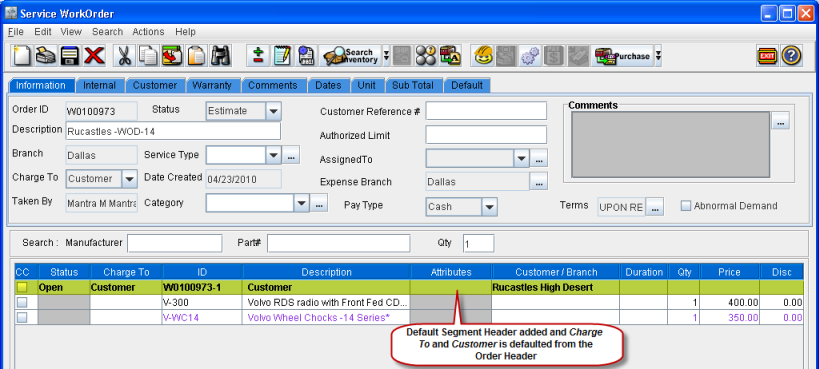
On creating a Work Order with Orphan lines, system will add a Default Segment Header to the Work Order and the orphan lines will be added below the Default Segment Header as shown in Figure 1.1.
Figure 1.1
Functionality
-
The Charge To and the Customer Details of the Default Segment Header will be defaulted from the Work Order header as shown in fig 1.2
-
If the Charge To and / or the Customer details is changed in the Work Order header, the same will be updated in the Segment header if the Invoice of the Segment is not posted as shown in fig 1.2
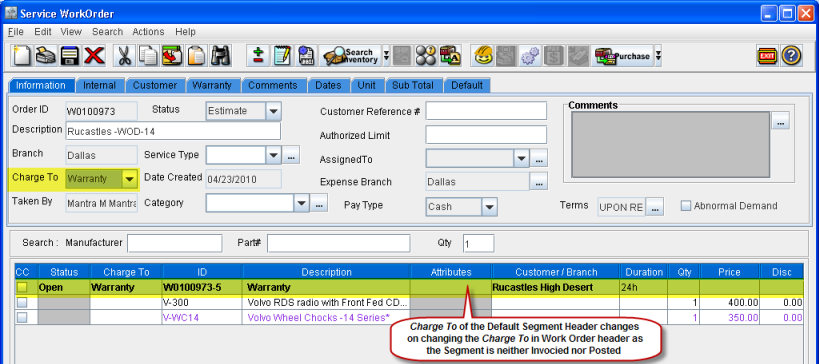
-
If the Default Segment is Invoiced, but it is not posted, then on changing either Charge To or the Customer in Work Order header, system will prompt a message.