(V 02.00.20-00)
Details
The support for Fusion Payment via Axia Payment Gateway has been provided.
This will enable card payments to be made with integrated card swiping instruments and real time reporting.
Axia Payment Gateway feature:
-
is compatible with Oracle DB Version 12c (12.1.0.2.0).
-
is currently not supported for Multi-currency in CR2.
Prerequisite:
-
Grant the permission V_$Instance and dbms_crypto to the CR2 Schema. This permission needs to be granted irrespective of using Axia or not because it reads the V_$Instance to know the Oracle DB Version for Axia compatibility.
For Example:
-
Grant select on V_$Instance to CR2;
-
Grant execute on dbms_crypto to CR2;
-
Follow the instructions on Readme section, given in Romco_Hotfix#56\Sqls\Axia SetUp provided along with the release for pre-setting required to be done for using the Axia Payment Gateway.
-
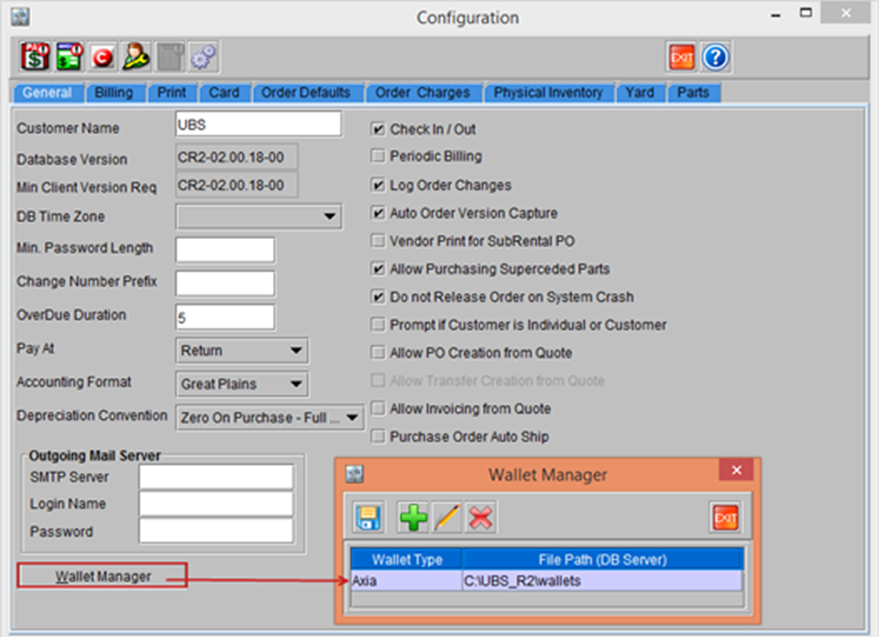
Once the Wallet is set at DB Server as mentioned in Readme section, you have to set the Wallet Path and Password in CR2 Configuration > General tab > Wallet Manager button > Wallet Manager window, as shown in Figure1.0
Figure 1.0 Wallet Manager