
Reference No: 25806
Details
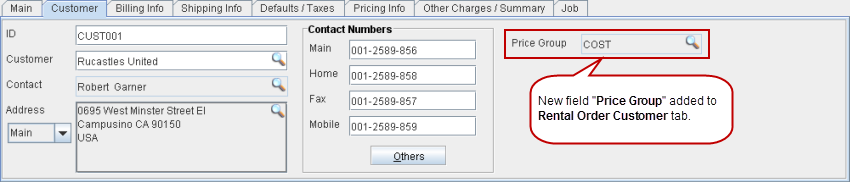
A Pricing Group can be tagged to a Rental Order in the Customer tab > Price Group field, as shown in Figure 1.0. When a new Rental Order is created for a Customer, the Pricing Group gets defaulted from the Pricing Group tagged for the Customer.
Figure 1.0 Pricing Group Tagged to a Rental Order
-
Items which have the same Pricing Group tagged in their Item Edit windows, as the one tagged to the Rental Order, will have their pricing defaulted from that Pricing Group.
-
A new Pricing Group can be tagged to a Rental Order by clicking the importable button in the Customer Tab > Price Group field and selecting a Pricing Group.
-
The system will prompt with the message "Changing Price Group will override the Pricing of lines. Override? ".
-
Clicking YES, will default the pricing for all the Items in the Rental Order, which has the newly tagged Pricing Group tagged to them in their Item Edit windows.
-
Items in the Rental Order which has either a different Pricing Group tagged t it or with no Pricing Group tagged to them at all, in their Item edit windows, won't be affected.
-
-