
To see how this feature works, you will need access to the PaymentFusion Reporting portal.
Upon logging-in you would be able to see many reports in the navigation panel.
Two of such reports are:
-
Transactions By Data: Organization
-
Transaction By Terminal: Organization
Upon select either of the two reports, you would be able to see filters in the main window.
By default, the time duration for the reports is last 24 hours (the report displays records pertainin to only the selected duration. However, you can modify the criterias as per your requirement.
The newly added column is added to the Transaction Regiter report.
Figure 8.0 Payment Fusion Reporting portal showing Transaction Register with Remote_id
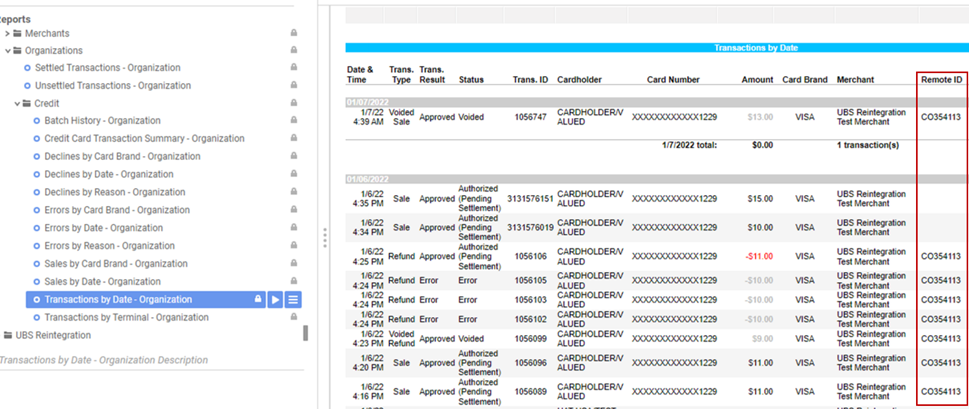
Remote ID field will show-up in the Axia transaction report, only in following conditions:
-
Auth capture by swiping the card on new Axia 3.0 compatible PAX device
-
Auth only by swiping the card on new Axia 3.0 compatible PAX device
-
Mark for Capture (MFC) from Auth only Payment which made by using new Axia 3.0 compatible PAX device.
-
Auth capture by using saved card which created using new Axia 3.0 compatible PAX device.
-
Auth only by using saved card which created using new Axia 3.0 compatible PAX device.
-
MFC from Auth only Payment made by using saved card which created using new Axia 3.0 compatible PAX device.
-
Refund on the payments made by using new Axia 3.0 compatible PAX device or saved card which created using new Axia 3.0 compatible PAX device.
-
Void on the payments made by using new Axia 3.0 compatible PAX device or saved card which created using new Axia 3.0 compatible PAX device.
Remote ID field will NOT show-up in the Axia transaction report, if any of the above conditions happens on Axia 2.0 compatible PAX device.