
Reference No: 27144
(V 02.00.20-00)
Details
Note Amount for an Asset can be entered in the Asset edit window > Notes Payable section > Note field, as shown in Figure 1.0.
Figure 1.0 Note Field in the Asset Edit Window
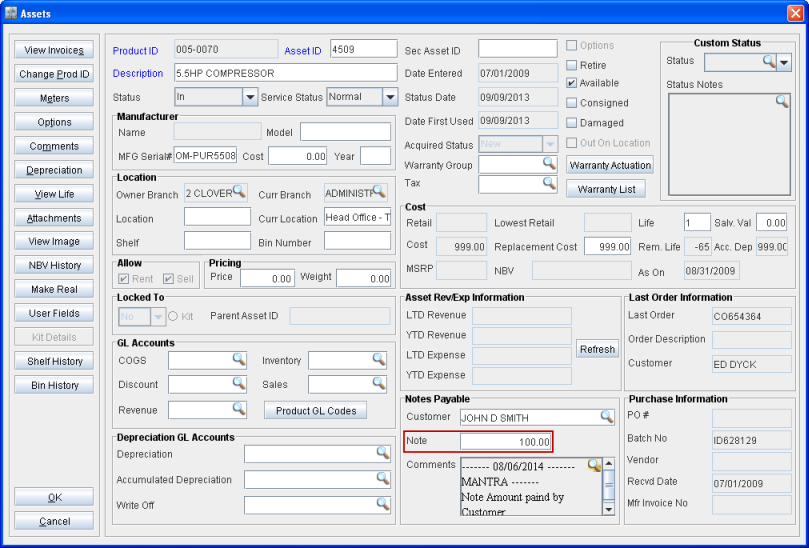
Note: The Notes Payable button in the Asset edit window is removed and the fields that were present within the Notes Payable button are placed in the Asset edit main window along the Note field under the Notes Payable section.
The Note amount entered for an Asset in the Asset edit window, will be defaulted in the Note field of the Sale Order Worksheet under the Other Info section on tagging the same Asset in a Sale Order Worksheet with Equipment drop-down option set as Stock, as shown in Figure 1.1.
Figure 1.1 Note Amount in the Sale Order Worksheet defaulted from the tagged Asset's Asset Edit Window
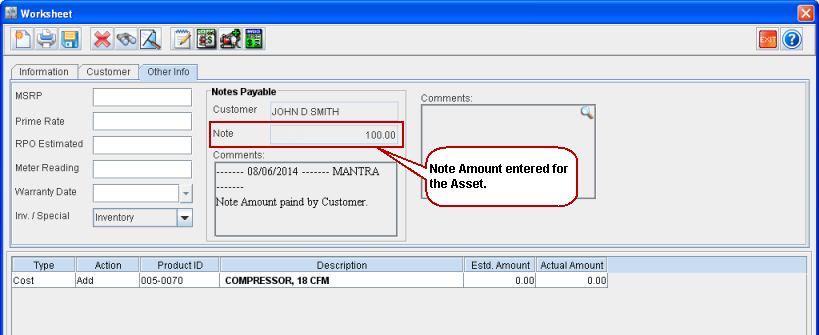
Note: The data for Note Payable (Customer, Note Amount and Comments) can be uploaded using Data Conversion. For details on Data Conversion, refer the Cr2DataConversionReadMe.doc document in the DataConverter folder of sqls.zip.