
Reference No: 26386
(V 02.00.19-00)
Defaulting Pricing of Sell Items and Parts in Rental Order based on their Pricing
Details
The Pricing of an Item/Part added to a Rental Reservation Order get applied based on the Price Group tagged in order. When added to a Rental Reservation Order:
-
Parts - get added with their Action as Sell and with their List/Cost/Fleet price listed under Day Price column, based on the Price Group (List/Cost/Fleet) tagged to the Order in Customer tab > Price Group field.
-
Sell Items (Items with Sell check box selected in Item edit) - get added with their prices listed under Day Price, Week Price, and Month Price columns based on the Pricing defined for the Price Group tagged to the Order in Customer tab > Price Group field.
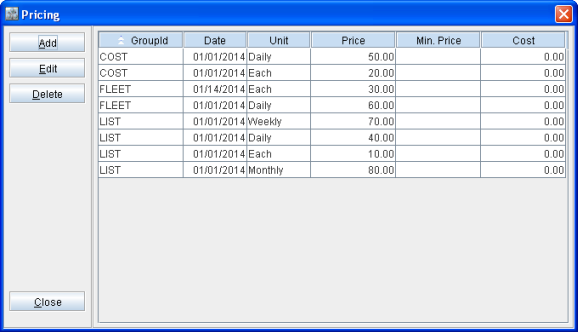
For example, an Item [ITEM#1] has its Pricing defined as shown in Figure 1.0.
Figure 1.0 Pricing defined for ITEM#1
-
On adding [ITEM#1] to a Rental Reservation Order with Price Group tagged as Fleet in Customer tab > Price Group field, it will get added with its price displayed as 60.00 under Day Price column alone.
-
On changing order Price Group tagged in Customer tab > Price Group to List, [ITEM#1] will display the prices of 40.00, 70.00, and 80.00 under Day Price, Week Price, and Month Price columns respectively.
-
On changing [ITEM#1] line's Action from Rent to Sell, it will display price only under Day Price column as 10.00 based on the Pricing defined - for the Price Group tagged to Order with Unit as Each.