
Consider a business scenario, where you modify an existing Order [Order ID CO301703], where the new total amount on the Order becomes than the existing (last received) Pre-Auth amount, in such case, the system will prompt to receive a new Pre-Auth for the updated amount.
Figure 13.0: Service Work Order [CO301703] showing newly add Equipment and Parts
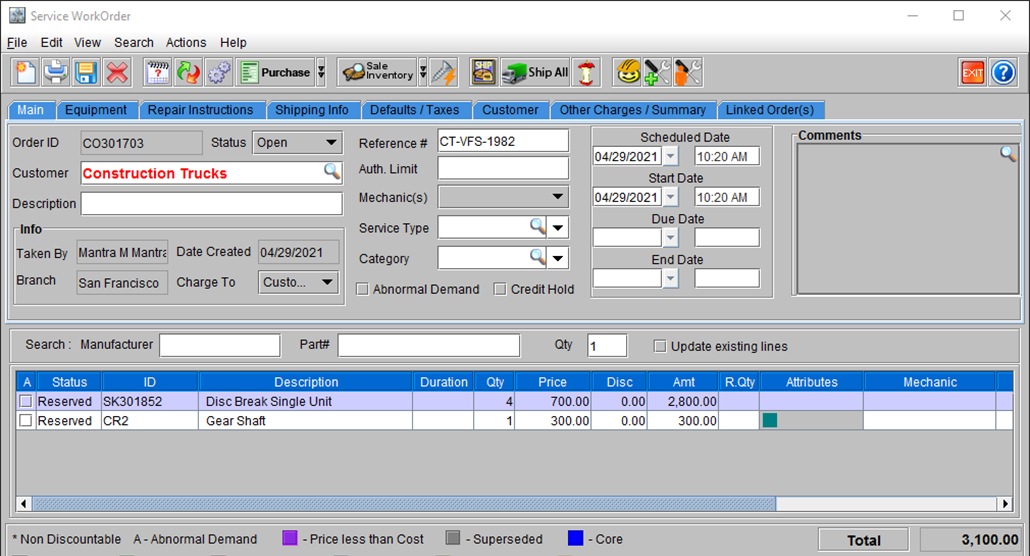
For Example: Let us say, you begin from Step#7, where the order amount was 280 and a Pre-Auth was already received on it, you decide to add more parts to the order [4 Units of Disc Brakes @ 700 per unit], which changed the total amount to 3100. Thus, the new order total is higher than the existing Pre-Auth amount.
At this point if you attempt to save the order, the system will prompt you to seek a fresh Pre-Auth as the existing authorized amount is lesser than current amount on the Order.
Figure 14.0: CR2 Prompting you to take appropriate action as Order amount has exceeded Pre-Auth limit
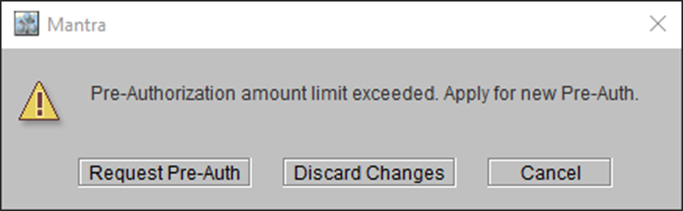
In this dialog box if you click on:
-
Request Pre-Auth: CR2 opens the Pre-Auth request window displaying the updated Pre-Auth Amount.
-
Discard Changes: CR2 closes the Order window without saving the changes to it.
-
Cancel: CR2 returns to the Order window, retains the changes however does not save it.