
Reference: 19309
(V 01.00.87-00)
Details
In a Purchase Order,a new Bill To Order option dialog (as shown below) has been now provided, which will be displayed on clicking the Bill To Order icon, with two option Orders and Work Orders. On selecting the Option Orders will work as it was working before. On clicking on the Work Order option in the Bill To Order dialog will allow the user to tag a Work Order to the PO line on the Purchase Order.
Figure 1.0 Bill to Order Dialog Box
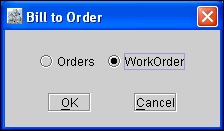
On selecting the Option Orders will work as it was working before. On clicking on the Work Order option in the 'Bill To Order' dialog box will allow the user to tag a Work Order to the PO line on the Purchase Order. On opening the tagged Work Order , and selecting View > Work Order Analysis , system will display the Total cost which will include the PO Line Cost on the Purchase Order.
Note: The Total Cost calculated will be applied only when viewing the Work Order analysis for Non-Segmented lines of the Work Order.