
Reference: 19338
(V 01.00.87-00)
Functionality
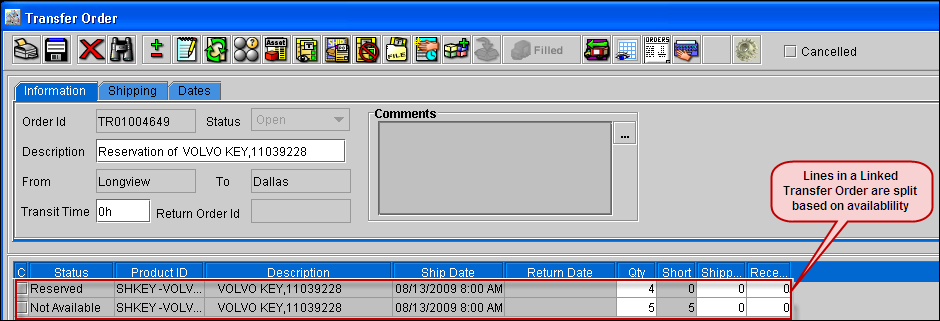
On upgrading to version 01.00.87-00, in a linked Transfer Order, the lines will be split based on the availability of the item/part in the T-Out Site.
-
If a Linked Transfer Order is created say for 10 Quantity and the available quantity in the T-Out site is only 7, then in the Transfer Order the lines will be split in two.
-
The first line will have status as Reserved with quantity as 7.
-
The second line will have status as Not-available with quantity as 3.
Figure 1.0
-
If a Not-available line in a linked Transfer Order is reserved for a partial quantity, then the Not-available line will be further split into two.
Figure 1.2
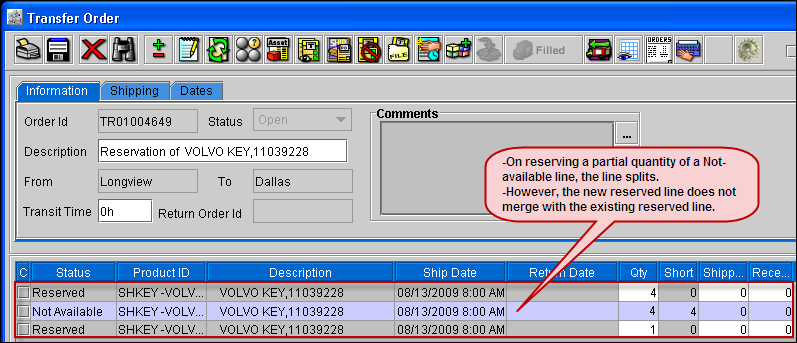
Illustration - A
-
Create a part, [Part#1] in Site-A and receive 5 quantity.
-
Log-in to Site-B and create an Order, [ORD#1] add [Part#1] with quantity as 10.
-
The Status of [Part#1] will be Not-available.
-
Create a Transfer Order [TO#1] for the Not-available line.
-
In [ORD#1] the lines will be split as:
-
T-Reserved - 5
-
Not-available - 5
-
Verify the Transfer Order [TO#1] in Site-A, the T-Out Site. In [TO#1] the lines will be split as below:
-
Reserved - 5
-
Not-available - 5
Illustration - B
-
Follow Step 1 - 6 of Illustration - A.
-
The lines in the [TO#1] will be as follows
-
Reserved - 5
-
Not-available - 5
-
In Site-B, create a Purchase Order for [Part#1] and receive 3 quantity.
-
In [TO#1] right-click the Not-available line with quantity 5, select the option Reserve.
-
Verify the [TO#1], the Not-available line will be split into two lines and a total of 3 lines will be present in the Transfer Order as:
-
Reserved - 5
-
Not-available - 2
-
Reserved - 3
-
In a linked Transfer Order, which has 2 lines one with status as Reserved and one with status as Not-available, on Reserving the Not-available line with partial quantity, the quantity that is reserved will not get added to the Reserved line which is already present, a new line will be added with status as Reserved, as in Illustration B.
-
For an independent Transfer Order, or the lines which are not linked to a Contract , the lines will not split based on availability of the item/part in the T-Out site.