Display the VFS Authorization numbers in the invoice and/or credit memo window
Details
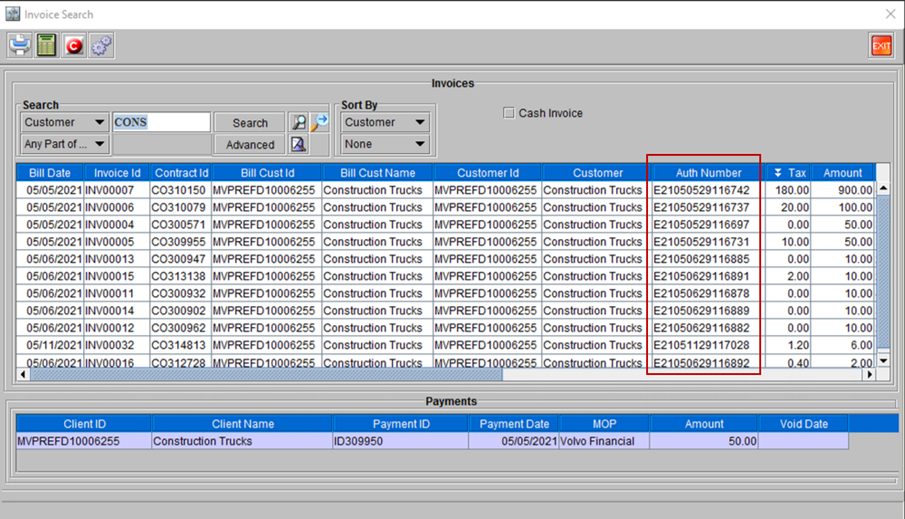
The Invoice information grid window now has an additional column (Auth Number) mentioning the VFS Authorization number that was used to get the Invoice amount approved by Volvo Finance. This helps in tracking each invoice transaction and its corresponding approval.
Sample Workflow
-
Search the Invoice for an Order using the Contract ID or Invoice Number.
-
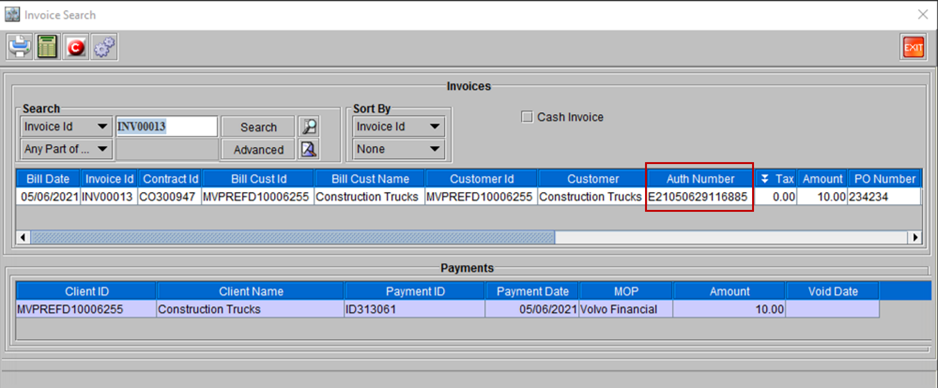
The ‘Invoice and Payment’ information window, shows a grid with Invoice Details in the upper panel and ‘Payment Details’ in the lower. As shown in the figure below. The column displaying the VFS authorization number is highlighted.
Figure 41: Searched Invoice ID [INV0013] showing the corresponding Auth Number
System also allows to do a blanket search based on any defined criteria, including a ‘string search’ using wildcard characters. For Example, shown below are the list of all invoices raised for the customer – Construction Trucks.
Figure 42: List of all Auth Nmbers used in all Invoices raised on Customer Name [Construction Trucks]