Adapting Great plains posting for compatibility with VFS Authorized Invoices
Details
Since all transactions done through VFS are pre-authorized, all it is required while processing a pool of invoices (including both VFS and Non-VFS invoices) is that the final amount for all VFS invoices should reflect as AR (Account Receivables).
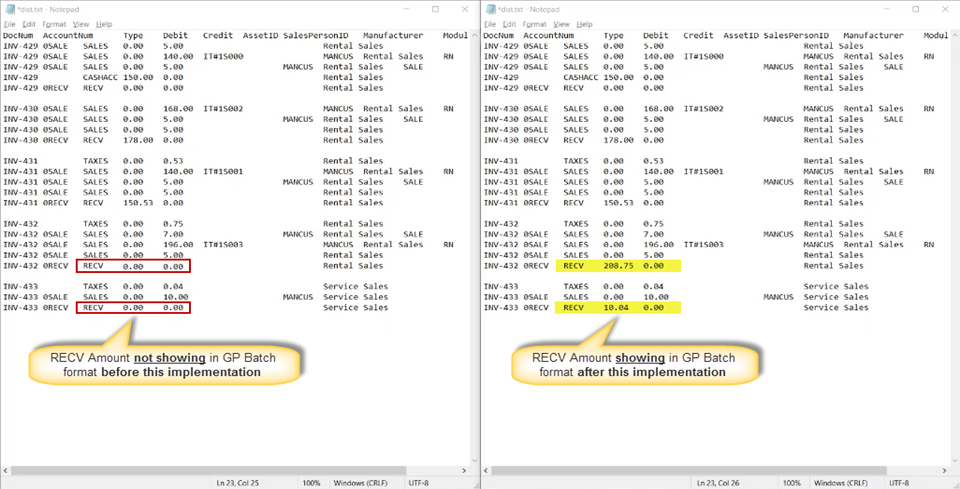
The attempt to makes all CR2 batches posted having any VFS invoices compatible with Great Plains format is have a specific field reflect this AR amount under the RECV heading.
Irrespective of how many invoices are posted in a batch, for each of the VFS invoices the batch report will have an individual line mentioning the RECV amount which is the Gross Total of all transaction for that specific invoice.
Prerequisite: A set of both VFS and Non-VFS invoices ready for posting. These can be Cash, Cash-only, Credit and other payment type invoices.
Sample Workflow
-
Take a collection of various VFS and Non-VFS invoices.
-
Post them into a batch.
-
Print the output of the batch in Great Plain format.
-
Open the generated log. (Shown in the figure below on the right pane) The GP batch format mentions the total receivable amount for each VFS invoices.
Figure 71: Comparison of how GP Batch format showed RECV amount for VFS invoices