Get VFS auth for additional invoices for a PSO, if the first invoice is already posted
Details
If you have a PSO, which has its invoice already posted, we may have two possible scenarios related to any additional/subsequent invoices.
-
Order was edited to add new items/modify quantity of items, and thus the total amount on the modified order increased.
-
Some items from the original order were returned, and thus the total amount on the modified order decreased.
In both the situations, the system will seek a fresh VFS authorization on the new total amount, which will subsequently be invoiced and posted.
Note: The ‘Ship Complete’ flag should be false.
Prerequisite: An existing PSO for which invoice is already posted.
Sample Workflow
-
Open any existing Part Sale Order for which an invoice has already been posted.
-
Original amount on the order is $24.30
-
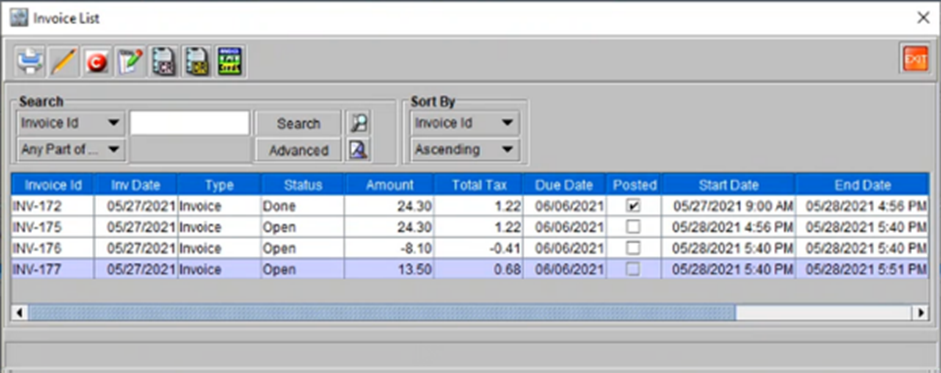
Invoice ID is INV-172.
-
-
Modify the order – to either increase or decrease the new final total amount.
-
For Example: Some items in the original order, which were not shipped earlier can be shipped now.
-
-
Invoice this modified order. VFS will seek for an auth automatically.
-
Here the authorization will be sought only for difference amount ($24.30).
-
Invoice is generated in the background and can be seen in the Invoice list window for the Order. Invoice ID is INV-175. However, the invoice is not posted.
-
-
Modify the order once again – return some parts so that there is a negative amount reflected in the invoice.
-
Invoice this modified order. VFS will seek for an auth automatically.
-
Here the authorization will be sought only for credit amount ($-8.10).
-
Invoice is generated in the background and can be seen in the Invoice list window for the Order. Invoice ID is INV-176. However, the invoice is not posted.
-
-
Modify the order once again – add some Misc. charges. This increases the total amount again.
-
Invoice this modified order. VFS will seek for an auth automatically.
-
Here the authorization will be sought only for credit amount ($13.50).
-
Invoice is generated in the background and can be seen in the Invoice list window for the Order. Invoice ID is INV-177. However, the invoice is not posted.
-
Figure 70: List of Invoices generated for Order ID [CO319147]