
Reference: 19451
Details
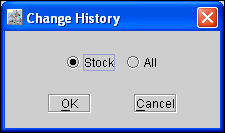
In a Part Edit window , a new dialog Change History has been now provided with the radio buttons Stock and All as shown in Figure 1.0, which will be displayed on clicking on the History button, wherein the user can select any of the radio button and can view the changes done to the stock or the Part Edit Window respectively.
Figure 1.0 New dialog 'Change History'
-
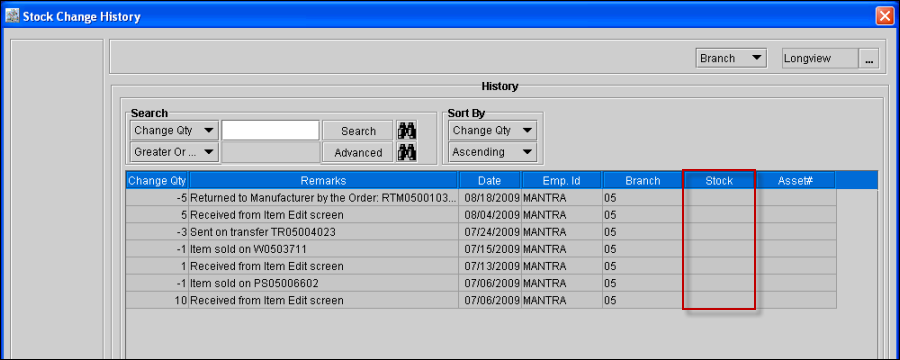
On selecting the Stock Radio button, system will display the 'Stock Change History' window as displayed in the earlier versions, which will display the changes done in the stock of the Part.
-
In the Stock Change History window, a new Column Stock has been now added, which will display the current Stock after each operation like receiving, selling, returning etc as shown in Figure 1.1.
Figure 1.1 Stock Change History Window
-
In the Stock Change History window the column RevertBack Qty has been now removed.
-
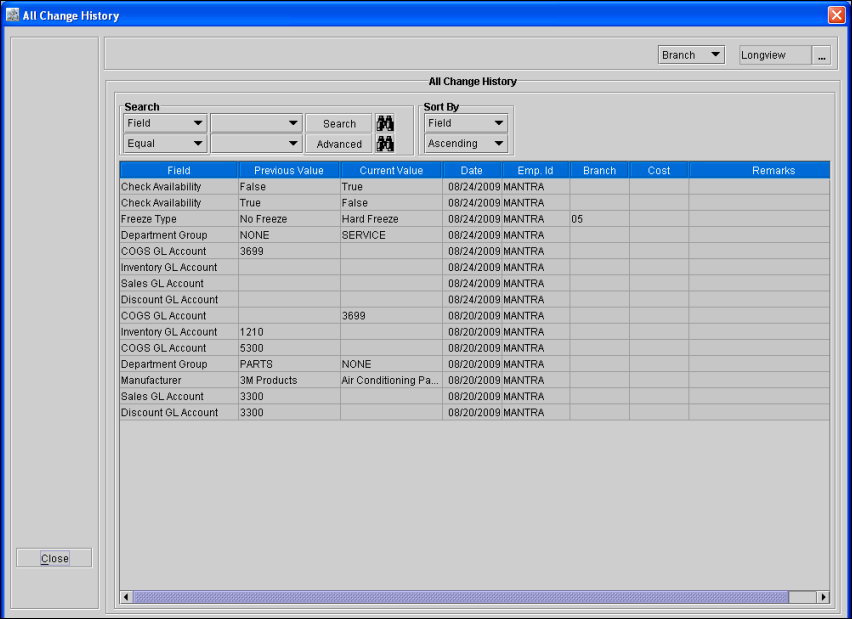
On selecting the All radio button will display a new window All Change History as shown in Figure 1.2, wherein the user will be able to view all the changes done in the Part Edit window.
Figure 1.2 New Window 'All Change History'
-
The changes done for the following fields will be displayed in the All Change History window:
-
Product ID, Description,.UPC, Manufacturer, Mfr.Part No, Allow Discount, Check Availability, Non Returnable, Stock Status, Transferable, Substitute Group, Price Group, Department Group, Options Group, Tax Group, Report, Group, Secondary Report Group,COGS GL Account, Inventory GL Account, Discount GL Account, Sales GL Account, Package Qty, List, Fleet, Lowest Retail, Cost, Weight, Length, Width, Height, Bin Number, Shelf Number, Min.Qty, Max.Qty, Set Qty, Freeze Date, Freeze Type, Freeze Duration, Core, Superseded, Stock.
-
Fields "Product ID, Description,.UPC, Manufacturer, Mfr.Part No, Allow Discount, Check Availability, Non Returnable, Transferable, Substitute Group, Price Group, Department Group, Options Group, Tax Group, Report, Group, Secondary Report Group,COGS GL Account, Inventory GL Account, Discount GL Account, Sales GL Account, Package Qty, List, Fleet, Lowest Retail, Cost, Weight, Length, Width, Height" will be stored without any site ID and will be searchable irrespective of site being selected while searching. No remarks will be inserted for this when the change is done manually in the Part Edit window.
-
Fields "Stock Status, Bin Number, Shelf Number, Min.Qty, Max.Qty, Set Qty, Freeze Date, Freeze Type, Freeze Duration" are specific to site in which part is edited and are stored in with the site in which the change is done. Bin and shelf can be modified from branch details screen. No remarks will be inserted for this when the change is done manually in the Part Edit window.
-
Core: When a new core is added to a part, system will display that Core added and the added SKU will be displayed in Current value Field. If the Core is deleted, then the history will display core deleted and the deleted SKU in previous field. The comments will be displayed for core.
-
Superceded : When a new Superceded is added to a part, system will display that Superceded added and the added SKU will be displayed in Current value Field. If the Superceded is deleted, then the history will display Superceded deleted and the deleted SKU in previous field. The comments will be displayed for superceded.
-
Stock : When ever the Stock Change History is inserted , then same should be inserted into Product Change History also with the current format of Old Value and new Value. Old value will be the stock before the operation and the new value will be the stock value after operation. And system will display the appropriate remarks same as in Stock Change History.
-
By default, on opening the history, system will display the change history for the current site as well as records without having any site, which will be displayed based on the change date in the descending order. User can search for any site or all sites. Region and subregion will work as all sites only.
-
While searching, on selecting the Value as blank for the search Field,system will display all the history records for all the search Types based on the selected site or all the sites.
Field Information of All Change History Window
The fields within the All Change History window are described in Table 1.0.
Table 1.0 Fields within All Change History Window
|
Fields |
Description |
|
Field |
Displays all the Field Type for which changes are done or displays the Field type that is selected in the search fields while searching. |
|
Previous Value |
Displays the value that was present in the Part Edit before changing the value. It can be blank if no value was defined for that field in the Part Edit before tagging a new value. |
|
Current Value |
Displays the value that is present in the Part Edit after changing the last value. It can be blank if the previous value is deleted and no new value is defined for that field in the Part Edit before. |
|
Date Modified |
The date and time when the change was done. |
|
Emp ID |
The unique identification number of the Employee who has done the change in that field of the Part Edit window. |
|
Branch |
Displays the Site ID for the fields in which the change was done. The Branch column will be blank if the site is not considered for the fields in which the change is done. |
|
Cost |
Displays the average cost which is specific only to stock history lines. |
|
Remarks |
Displays appropriate remarks when stock gets changed, fields are modified outside Part Edit Window, core and superceded. |