
Reference No: 26492 E4PL395423
(V 02.00.19-00)
Details
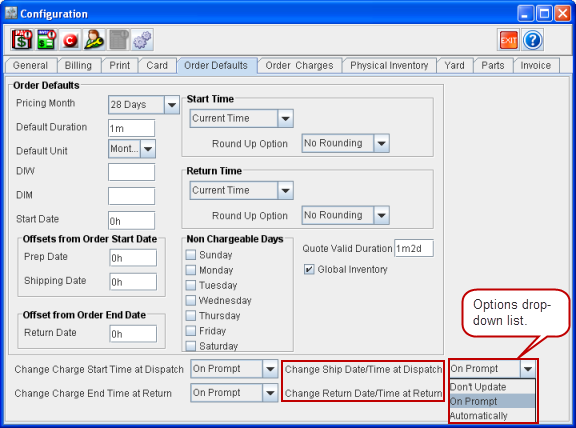
When dispatching/returning Items on an Order, the Ship Date and Time and Return Date and Time can be set in the Configuration module to be updated or not. The appropriate settings can be done using the drop-down list named Change Ship Date/Time at Dispatch and Change Return Date/Time at Return in Configuration module > Order Defaults tab, as shown in Figure 1.0.
-
Don't Prompt - When Don't Prompt option is selected, the Order Header dates are considered by default and the system does not prompt any message to change the Ship Date/Time and Return Date/Time while dispatching and returning Items on an Order.
-
On Prompt - When On Prompt option is selected, the system displays a prompt message where the Ship Date//Time and Return Date/Time can be changed while dispatching and returning Items on an Order, as shown in Figure 1.1. By default it displays current Date/Time.
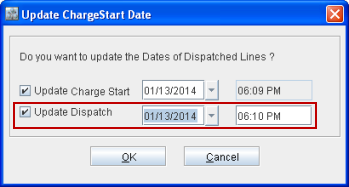
Note: The Start Time and End Time fields are displayed irrespective of whether the Allow Fractional Charge Duration check box in the Configuration module > Billing tab is selected or not.
-
Automatically - When Automatically option is selected, the system automatically updates the Ship Date/Time and Return Date/Time to current system date while dispatching and returning Items on the Order. When shipping Item(s) on the Order before the Order Charge Start Date, the system automatically updates both Prep Date and Ship Date of the Item(s) to the current system date.
Points to Note
-
In an Invoice print using 159500UI, CID's 141 and 142 are provided to print Ship Date and Return Date respectively.
-
The Start Time and End Time fields are displayed irrespective of whether the Allow Fractional Charge Duration check box in the Configuration module > Billing tab is selected or not. Various locations where the Start Time and End Time fields get displayed are:
-
Quote/Reservation Order Information dialog box.
-
Order Main tab > Dates panel.
-
Order line information dialog box > Dates tab.
-
Update Charge Start Date dialog box while dispatching Item(s) on an Order.
-
Update Charge End Date dialog box while returning Item(s) on an Order.