
Reference : 22161
(V 02.00.02-00)
Details
In Cr2, you can set up the default Price Group, Billing Terms and Unit that has to be defaulted to the order based on Order Duration . This can be done using the feature Set Pricing and Billing Terms present in the Configuration Module as shown below.
Figure 1.0
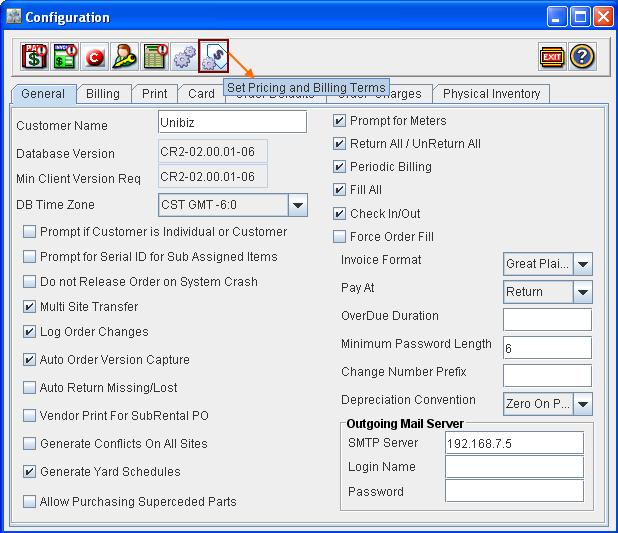
Steps to define Pricing Unit and Billing Terms based on Order duration:
-
Access Configuration Module.
-
Click on the Set Pricing and Billing Terms icon

-
System displays the Set Pricing and Billing Terms window with existing definitions (if any).
-
Click on the Add icon

-
In the dialog displayed, first enter the Duration that has to be considered for defaulting the new Pricing and Billing term definition.
-
Select the Billing Terms for the definition. You can select a billing term definition from the Billing Terms window , which can be invoked by clicking the import button present in the field.
-
Select the Pricing Unit. You can select a pricing unit by clicking on the drop down field present in the Unit field and then selecting any of the available options.
-
Select the site to which the definition has to be applied to. Note that, if you don't select any site in the site field, then the definition will be considered for all sites.
-
Next, select the option in the Use For option, to select when the definition has to be applied. You can set the option as either Create, Update or Create/Update.
-
On selecting the Use for option as Create, then the Pricing and Billing Term definition will be applied only while creating a new order.
-
On selecting the Use for option as Update , then the Pricing and Billing Term definition will be applied only when the order duration is modified/updated.
-
On selecting the Use for option as Create/Update, then the Pricing and Billing Term definition will be applied when a new order is created and also when the order duration is modified.
-
-
Click OK to save the settings.
-
The newly created Pricing and Billing Term definition will be displayed in the Set Pricing and Billing Terms window.
-
Click on Exit icon to exit from the window. Select the option Yes, in the save prompt which is displayed on exiting.
-
Exit from the Configuration Module.
-
Log-Off and re-login to the application in-order to make the newly created definition in-effect.
Figure: 1.1
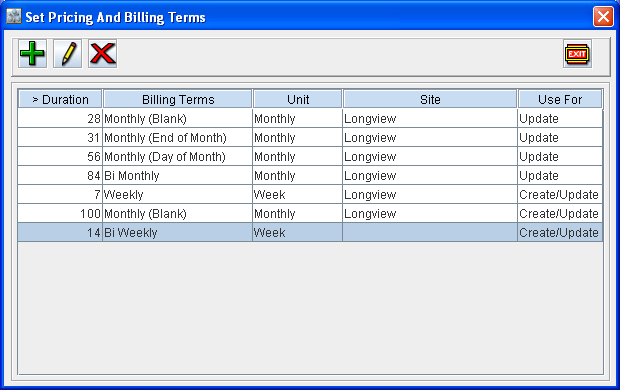
Implementation of Set Pricing and Billing on Charge Definition in orders
-
Depending on the Charge Duration of the Order, the Pricing Unit, and Billing Terms will be applied to the Order. (When order is created newly or when edited to have the charge duration greater than this duration )
Usage Illustration for how Pricing and Billing definition will be considered based on duration
Table: 1.0 Pricing and Billing definition in Configuration
|
>Duration |
Billing Terms |
Unit |
Site |
Use For |
|
7
|
Weekly |
Weekly
|
|
Create/Update |
|
14
|
Bi Weekly |
Weekly |
|
Create/Update |
|
28
|
Monthly-I |
Monthly |
|
Create/Update |
Table: 1.1 Duration of the Order and the Pricing and Billing definition considered
|
Order Duration |
Pricing and Billing Terms definition considered (as per above table) |
|
Greater than 7 days and up to 14 days |
Definition with billing terms set as Weekly |
|
Greater than 14 days and up to 28 days |
Definition with billing terms set as Bi-weekly |
|
Greater than 28 days |
Definition with billing terms set as Monthly |
|
If Order duration is less than or equal to 7 days |
Pricing and Billing Terms definition present for the order customer. If definition is not present for the customer, then will be displayed as blank. |
-
While creating an Order or modifying existing order charge duration, system will first verify if any Set Pricing and Billing on Charge record is present for the order site, for the defined order duration with the corresponding Use For option present, if found the same will be applied to the order. If no definition is found for the order site, then system will consider the definitions for which no sites are tagged.
-
If no Pricing and Billing on Charge definition is present for the order duration, then system will default Pricing and Billing Term definition present for the Order customer to the order. If no Pricing and Billing Term definition is present for the customer, then the pricing and billing terms will be displayed as blank in the order.