
Reference No: 24718
(V 02.00.13-00)
In versions prior to 02.00.13-00
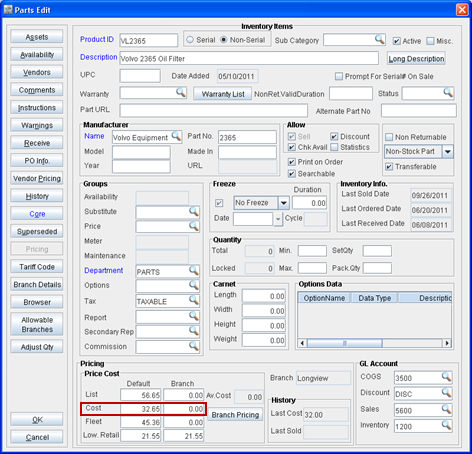
While procuring a part to the inventory through purchase orders, if the cost defined for the part in Parts Edit window > Cost field (refer fig 1.0) is different to the price present in the voucher, it was always needed to manually update the part cost.
Fig 1.0 Cost field in Part Edit window
With effect to Ver 02.00.13-00
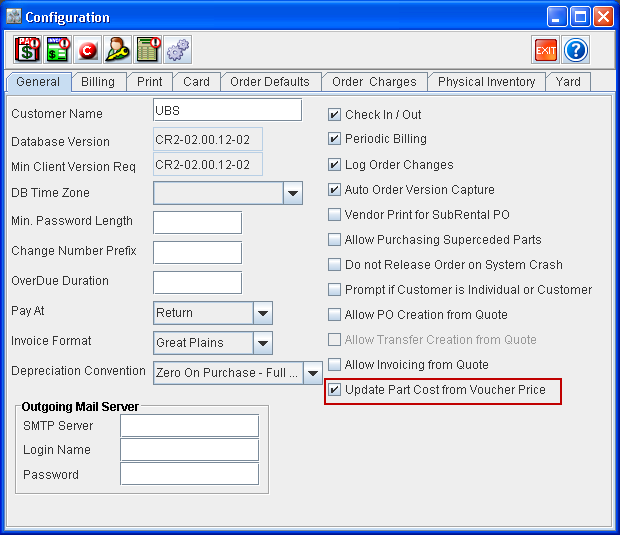
Now, when parts are received to the inventory using Purchase Orders, you can set the Part Cost to be automatically updated when the Vouchers created for the Purchase Orders are posted. This can be done by selecting the option 'Update Part Cost from Voucher Price' which is present under the Configuration module > General tab. Refer fig 2.0 for illustration.
Fig 2.0 Update Part Cost from Voucher Price' Option in Configuration
With the option 'Update Part Cost from Voucher Price' selected, when the vouchers are posted,system will verify if any Branch Cost is defined for the part. If Branch-Cost is defined, then system will update only the 'Branch' cost for the part, and if Branch-Cost is not defined system will update the 'Default' cost for the part.