
Reference: 23095
(V 02.00.07-00)
Details
In Cr2, you can use the option Charge Duration Based On Midnight present in Configuration-Billing tab (Refer Illustration 1.0) for setting Charge start time as 00:00 hrs or 12 AM depending on the time format defined in R2.ini file.
If time format in the R2.ini file is defined as British and Charge Duration Based On Midnight option is selected as True in Configuration-Billing tab, system sets the charge start time as 00:00 hrs. Similarly, if time format in the R2.ini file is defined as American, and Charge Duration Based On Midnight option is selected as True in Configuration-Billing tab, system sets the charge start time as 12 AM.
Charge Duration Based On Midnight can only be selected if Allow Fractional Charge Duration is selected as False. If Allow Fractional Charge Duration is selected as True, Charge Duration Based On Midnight cannot be selected as True.
Figure 1.0
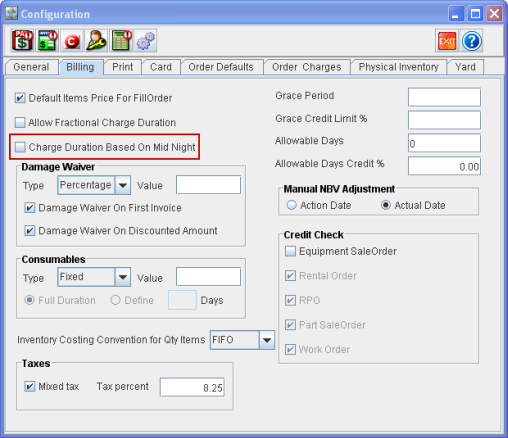
Illustration
-
In Configuration-Billing tab, select Charge Duration Based on Midnight as True.
-
Create an Order [ORD#1] from 07/10/2011 to 07/11/2011.
-
System displays Charge start and end time as 12 AM.
-
Click on Ok.
-
In the Order window, system displays Charge duration as 2 days.
-
Add an item [Item#1] to the Order.
-
Define Pay at as Periodic Billing and Billing Terms as Daily.
-
Invoice the Order and check the invoice.
-
In the Invoice List window, system displays two Invoice lines. The first invoice is generated for 07/10/2011, 12 AM to 07/10/2011, 11.59 PM and the second invoice is generated for 07/11/2011, 12 AM to 07/11/2011, 11.59 PM.
Note: While creating an order with Charge Duration Based on Midnight selected as True, system sets charge start and end date as 12 AM and does not allow the user to modify the timings.