
Reference No: 25617
(V 02.00.16-00)
Importing Initial Customer Balance from Previous Application
Details
In CR2, the Initial Balance of Customers can be carried forward from the previous application, by importing their unpaid Invoices.
-
This will in turn affect the Credit Available for the Customer.
-
These unpaid invoices have to be paid off in full to regain the blocked credit.
-
These invoices cannot be processed in any other way in the application other than receiving payments against them. For example, they can't be printed, exported out, cancelled and so on.
-
To import unpaid invoices from the previous application to CR2, please refer Cr2DataConversionReadMe.doc within the sqls.zip file.
-
The application won't restrict you for importing paid invoices, as well, from the previous application.
-
Payments can be received against these invoices by selecting the appropriate tab delimited file in Import Payment Details dialog box (accessed by clicking Invoicing > Import Invoice Payment Details icon) and choosing the following options, as shown in Figure 1.0. The column details of the tab delimited Payment Details File is provided in Table 1.0.
-
Update = Invoice Balance/Customer Payments radio button.
-
Type = Great Plains.
Figure 1.0 Import Payment Details Dialog Box
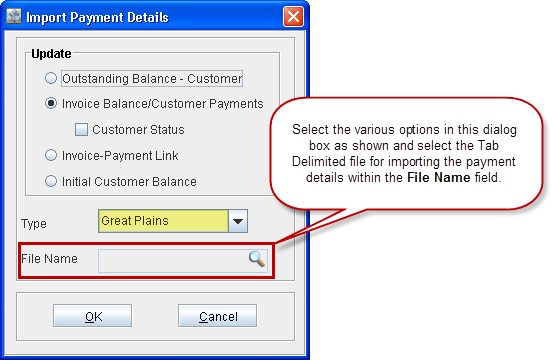
Table 1.0 Column Details of the Import Payment Details Tab Delimited File
|
Column No. |
Data Type |
Extract from Great Plains and Quick Books - Tab Delimited |
|
1 |
Text |
The Customer ID which is already present in CR2. |
|
2 |
Number/Text |
Payment Type:
|
|
3 |
Text (Max 21/24) |
Document Number:
|
|
4 |
Date (MM/DD/YYYY) |
Document Date:
|
|
5 |
Amount |
Original Transaction Amount:
|
|
6 |
Amount |
Outstanding Amount:
|
|
7 |
Number |
MOP (Expected only if the Payment Type is 9). |
|
8 |
Number |
Expected only if the Payment Type is 9. Statuses are:
Note: Void can not be changed to Open. |
|
9 |
Date (MM/DD/YYYY) |
Expected only if the Payment Type is 9. Void Date - Only if the above status is Void. |