Reference No: 26222
(V 02.00.19-00)
Details
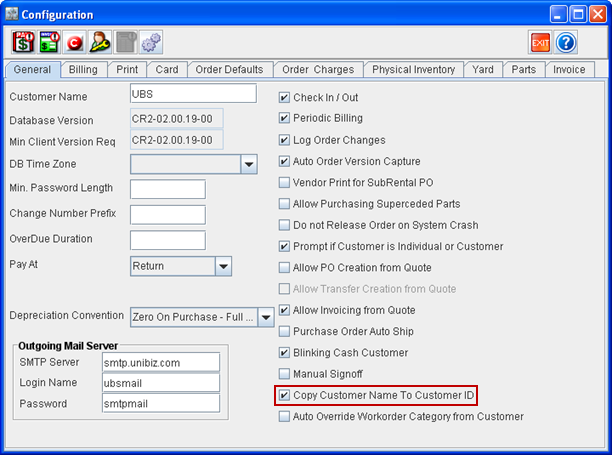
Customer ID can be defaulted from the entered Customer Name by selecting Copy Customer Name to Customer ID check box in Configuration module > General tab. When IDS is defined to generate Customer ID, and if Copy Customer Name to Customer ID check box is also selected, then Customer name will over right the IDS generated ID.
Figure 1.0 Copy Customer to Customer ID in Configuration module > General tab
While creating or editing a Customer, the text provided in the Name (Customer Name) field of customer edit window can be defaulted to the ID (Customer ID). A maximum of 100 characters can be entered in the Name field and the ID field will display only the first 50 characters of the Name field.
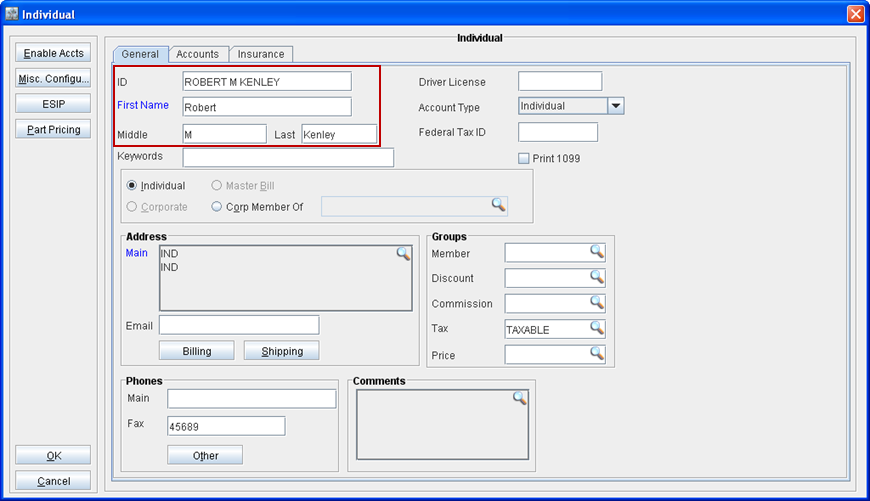
For an Individual Customer, the text provided in the First Name, Middle and Last fields will be defaulted to ID field with format as <First Name>+<Middle>+<Last>, as shown in Figure 1.1. A maximum of 50 characters can be entered in each of the three fields and the ID field will be truncated to the first 50 characters after concatenating the entries in First Name, Middle and Last fields.
Figure 1.1 ID Defaulting from First Name, Middle and Last fields for an Individual