
Reference No: 21537
(V 02.00.00-00)
Drop Ship and Auto Ship / Receive options in Defaults Module
Details
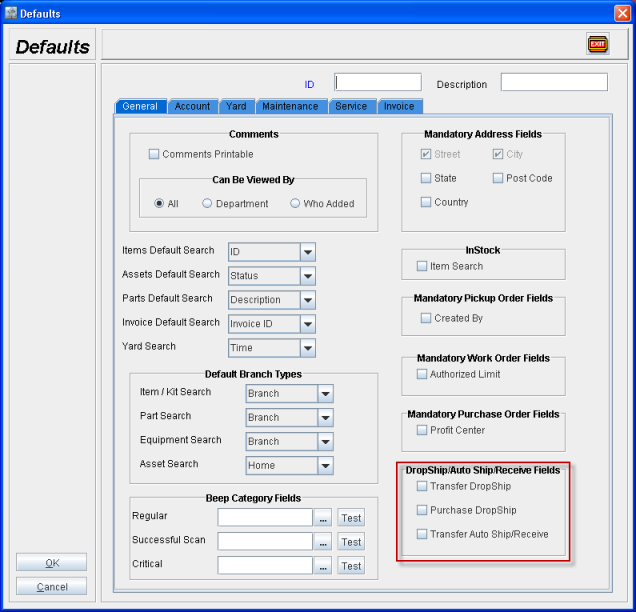
The Drop Ship and Auto Ship / Receive options in Defaults module allows you to set the default status of the Drop Ship and Auto Ship / Receive options in Transfer Order or Purchase Order which is newly created.
-
Transfer DropShip
If this option is selected, then on creating a New Transfer Order, irrespective of whether the Transfer Order is linked to an Order or not, the Drop Ship option in the Shipping tab will be set as selected.
If this option is not selected, then on creating a New Transfer Order, irrespective of whether the Transfer Order is linked to an Order or not, the Drop Ship option in the Shipping tab will be set as de-selected.
-
Purchase DropShip
If this option is selected, then on creating a New Purchase Order, irrespective of whether the Purchase Order is linked to an Order or not, the Drop Ship option in the Shipping tab will be set as selected.
If this option is not selected, then on creating a New Purchase Order, irrespective of whether the Purchase Order is linked to an Order or not, the Drop Ship option in the Shipping tab will be set as de-selected.
-
Transfer Auto Ship/Receive
If this option is selected, then on creating a New Transfer Order, irrespective of whether the Transfer Order is linked to an Order or not, the Auto Ship/Receive option in the Shipping tab will be set as selected.
If this option is not selected, then on creating a New Transfer Order, irrespective of whether the Transfer Order is linked to an Order or not, the Auto Ship/Receive option in the Shipping tab will be set as de-selected.
Note: The status of the Auto Ship / Receive check box is not dependent on the selection of the Drop Ship option in the Transfer Order. Both the features are independent.