Reference No: 19287
(V 01.00.87-00)
Table of Contents
Details
Support is now provided for changes in Parts Inventory Valuation Report of Reports Module g Inventory. The changes incorporated are as mentioned below:
Date Filter
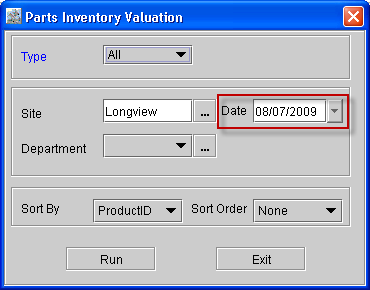
In the Parts Inventory Report options dialog a new field Date is added as shown in Figure 1.0. This Date filter allows you to view the Parts Inventory Valuation Report as on the selected Date.
Figure 1.0
Total Avg Cost
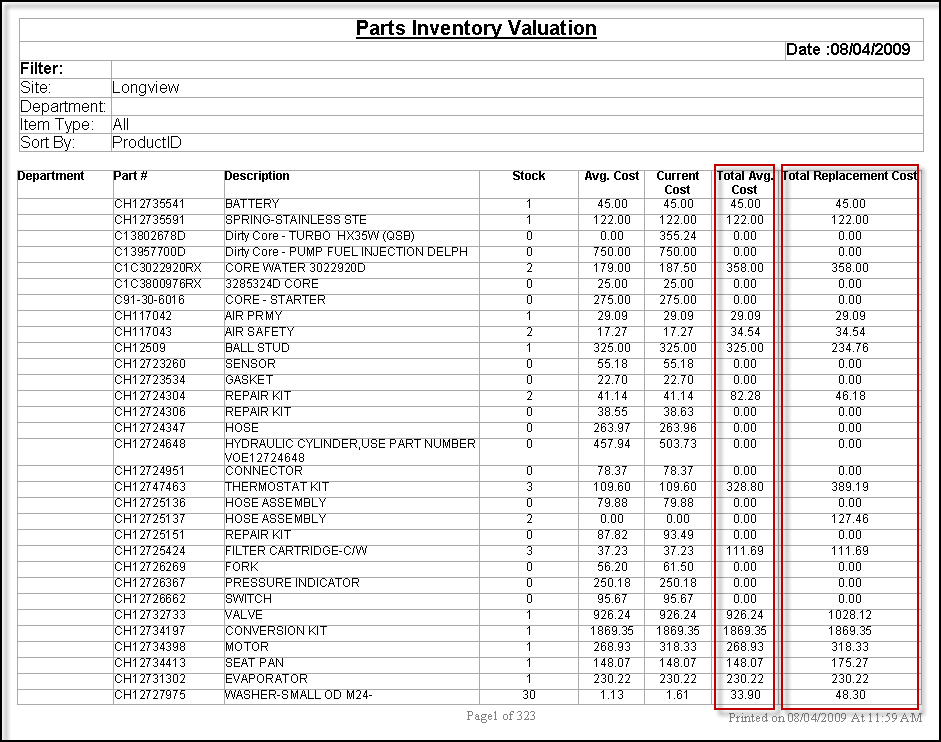
In the Parts Inventory Report, the label of column Total Cost is changed to Total Avg. Cost (as shown in the image below) as the value of this column is calculated as given below:
|
Value of Avg. Cost * Quantity |
Total Replacement Cost
A new column Total Replacement Cost is added to the Parts Inventory Report, this column will display the Total Replacement Cost of the Parts, the calculation is as follows:
|
Replacement Cost of the Part as in Part Edit window * Quantity |
Sample Report