
(V 02.00.21-00)
What is CustomerPriceFreeze?
This is a simple step which can be taken by a customer on any of the products to freeze (lock or reserve) the price of the product for a specific duration.
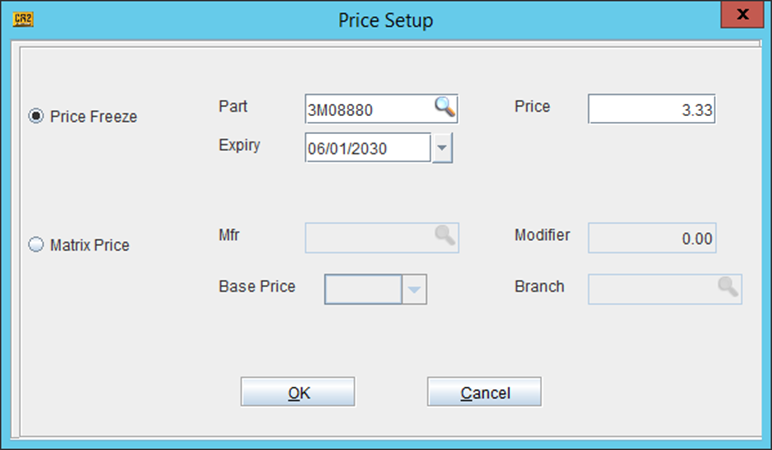
To do a price freeze, you must have the following fields handy.
-
Part Number: This is the Sr. No. by which you search/identify the product.
-
Price: This is the amount at which you want to lock or reserve the price.
-
Expiry Date: The locked price is valid only until this date.
-
Customer ID: This is the name of the customer for which the PriceFreeze has been implemented.
To perform CustomerPriceFreeze, search and open the Customer Edit window.
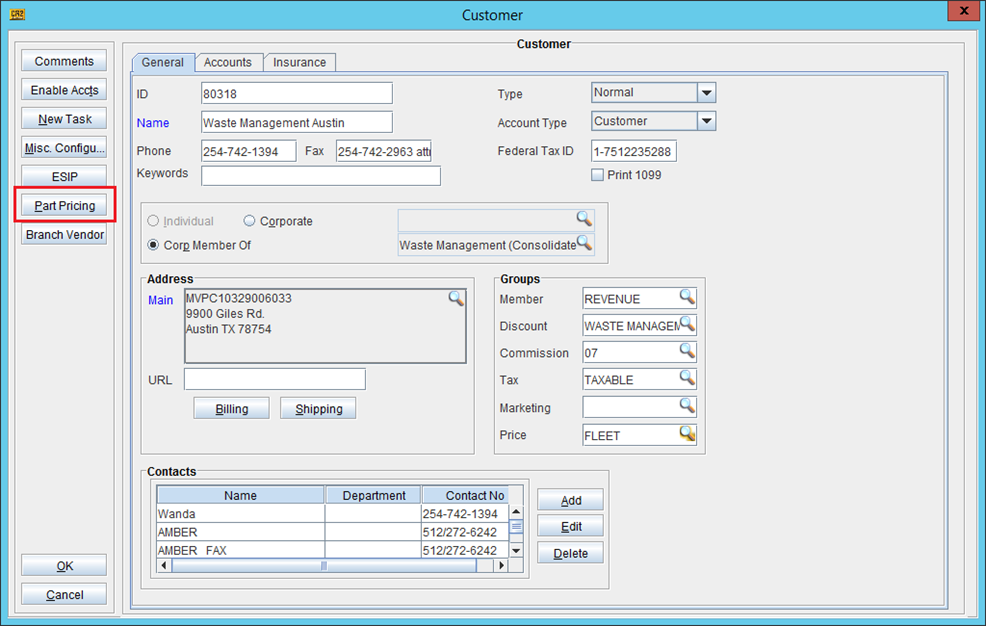
Clicking PART PRICING button, to open the Price Freeze window.
This data conversion can be used to create/update one or more CustomerPriceFreeze lines in CR2.
Commands for different types of data conversions are:
-
Creating: convert8i CustomerPriceFreeze <username>/<password>@<Service Name><CSV File Name>
-
Updating: convert8i CustomerPriceFreeze <username>/<password>@<Service Name><CSV File Name> -u
-
Force Updating: convert8i CustomerPriceFreeze <username>/<password>@<Service Name><CSV File Name> -fu
Table 1.3 Field in the CSV File to be used for creating CustomerPriceFreeze
|
Column Name |
Description |
Data Type |
Default Value |
Is Mandatory? |
Is Updateable? |
|
SKU |
Product ID |
VarChar2(22) |
NA |
Yes |
|
|
CustomerID |
Customer ID |
VarChar2(50) |
NA |
Yes |
|
|
Price |
Product’s Price |
Number(11,2) |
|
Yes |
Yes |
|
ExpiryDate |
Customer Price Expiry Date in MM/DD/YYYY format |
Date |
|
Yes |
Yes |