
Reference: 24946 C5VA476144
Details
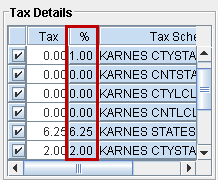
In CR2, a new column named % is added in the Tax Details section under the Defaults/Taxes tab of Orders. The details of this column is given in Table 1.0.
Table 1.0 Details of Newly Added Column
|
Column Name |
Description |
|
% (percentage) |
This column displays the tax percent defined in the Maintenance > System > Taxes.
The % column is added for the following Orders:
|
Figure 1.0 Newly Added Column %
Printing Tax Percentage
The Tax Schedule Descriptions and corresponding Percentages can be printed as described in Table 1.1.
Table 1.1 Printing Tax Description and Percentages
|
UI File Name |
CID Name |
Decsription of the Print |
|
3 |
Tax Schedule Decsription (Existing CID). |
|
4002 |
Tax Schedule Description with Tax Percentage. (New CID). |
|
|
|
3 |
Tax Schedule Decsription (Existing CID). |
|
10 |
Tax Schedule Description with Tax Percentage. (New CID). |