
Reference No: 22646
(V 02.00.03-00)
Details
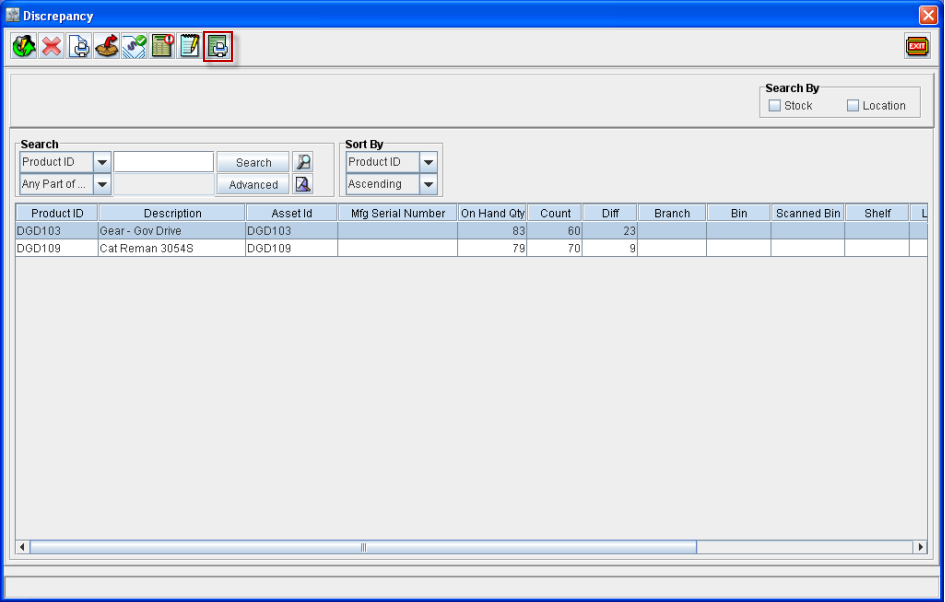
In Physical Inventory Module, you can generate the Recount Sheet Report from within Discrepancy window, which will display the non-adjusted physical Inventory lines which are having difference in On hand quantity and Count.
Steps to generate Recount Sheet Print
-
Access Physical Inventory Module.
-
Invoke Discrepancy window of Physical Inventory batch for which print has to be generated.
-
Click on Print Recount Sheet Icon

-
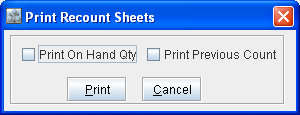
System displays the Print Recount Sheets dialog as shown below :
-
Select the option Print On Hand Qty, if On hand Qty has to be displayed in the print generated.
-
Select the option Print Previous Count, if value entered for Count to be displayed in the print generated.
-
Click on Print Icon .
Report Sample
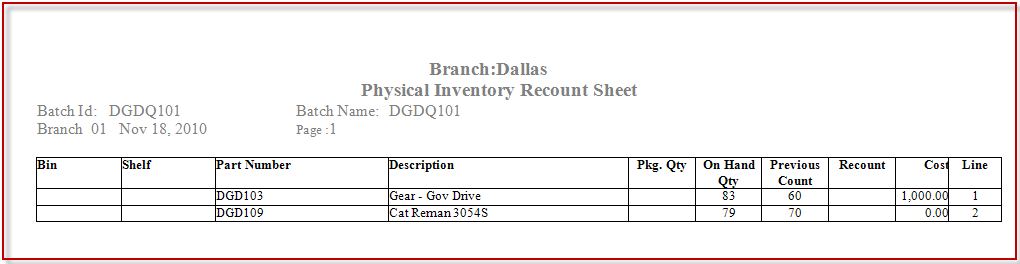
Recount Sheet Report Fields Information
|
Field |
Description |
|
Bin |
Bin Number of the Part |
|
Shelf |
Shelf Number of the Part |
|
Part Number |
Unique ID of the Part |
|
Description |
Part Description |
|
Pkg.Qty |
Package Quantity for the Part in Part Edit window. |
|
On Hand Qty |
Current Stock of the Part |
|
Previous Count |
Count value entered for the Part |
|
Recount |
<blank> Note : This field will be displayed as blank, to facilitate manual entry of values. |
|
Cost |
Cost of the Part as displayed in physical inventory record. |
|
Line |
Line number |