
Purchase Orders section allows you to search and tag the items/assets/parts that are to be returned, as shown in Figure 1.4. Search can be performed based on PO ID, Status, Product ID, Description, Asset ID, Vendor ID, Receive Batch ID (Rec. Batch ID), Received Quantity (Rec.Qty.), Return Available Quantity (Ret. Avail. Qty.), Quantity (Qty.), and Vouchered status (Vouchered).
Figure 1.4 Purchase Orders Section
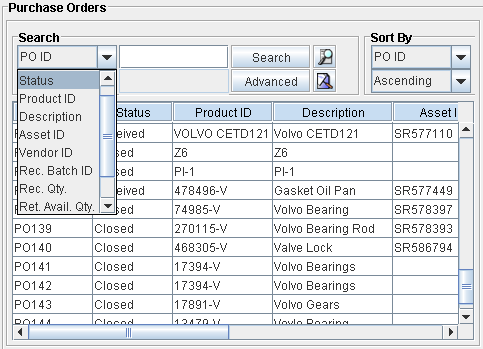
The various columns under which information is displayed within the Purchase Orders section are:
Table 1.5
|
Search Option |
Full Name |
Description |
|
PO ID |
Purchase Order ID |
Order ID of the Purchase Order through which the item/part was received. |
|
Status |
Status |
Status of the Purchase Order. |
|
Product ID |
Product ID |
ID of the Product. |
|
Description |
Product Description |
Description of the Product. |
|
Asset ID |
Asset ID |
ID of the Asset. |
|
Vendor ID |
Vendor ID |
Vendor ID of Vendor tagged to the Purchase Order. |
|
Rec. Batch ID |
Receive Batch ID |
The Batch ID in which the item/part was received on the Purchase Order. |
|
Rec. Qty |
Received Quantity |
The quantity received in each batch. |
|
Ret. Avail. Qty. |
Return Available Quantity |
The quantity that is currently available for returning. |
|
Qty |
Quantity |
The quantity of this item/part to be returned can be entered here. |
|
Vouchered |
Vouchered |
Whether the particular line is vouchered or not. |
|
Price |
Price |
Price of the line in PO Voucher. |