
Reference: 21169
(V 01.00.94-00)
Details
In CR2, the Authorized Limit feature present in the Work Order will allow you to define pre-authorized amount limit for the segment lines for which Charge To is set as either Customer or Warranty. The Authorized Limit feature will provide you the ability to define authorize limit individually for the Header Segment Lines and also the Work Order Segments (segments which are added in Work Order).
Note: The enhancement addressed in the document will be applicable only for the Service Work Orders.
Defining Authorized Limit in Work Orders
Defining Authorization Limit for Work Order Segments
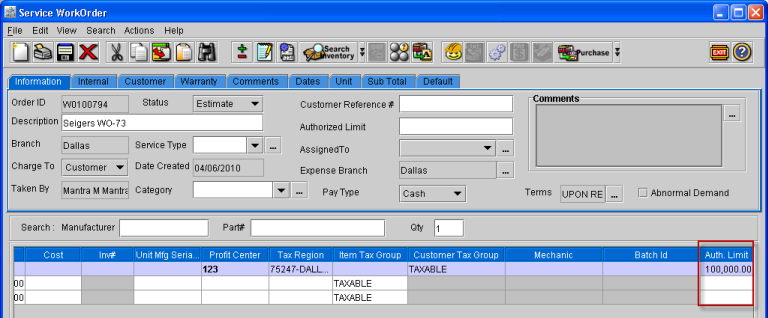
The Auth.Limit column (as shown below) in the Work Order window enable you to define pre-authorized amount limit for work order segments.
Figure 1.1
Defining Authorization Limit for header segment lines
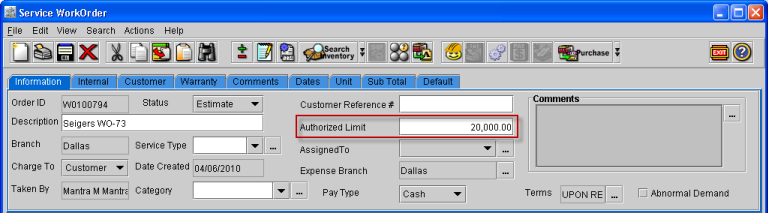
You will be able to define pre-Authorized Limit for the header segment lines using the field Authorized Limit present in the Work Order header (as shown below).
Figure 1.2
-
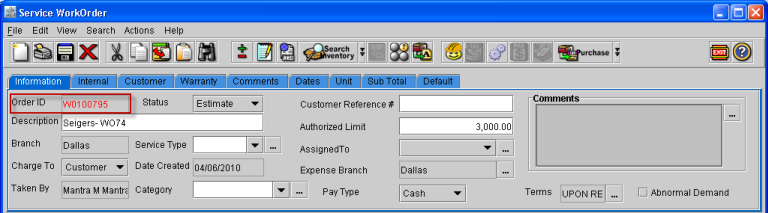
If any value is entered for work order segment Authorized Limit, then on saving the order system will verify if the segment line total amount (total amount for all lines present under the segment) with the value defined for the Segment Authorized Limit. If the segment total amount is greater than the Auth.Limit amount defined, then system will display the Work Order ID in red color as shown in Figure 1.3.
Figure 1.3
-
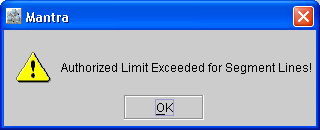
On exiting the Work Order, if the Authorized Limit is exceeded system will display an alert message notifying the same as shown in Figure 1.4.
Figure 1.4
Note:
-
If Authorization Limit is not defined for the individual segments (present in the order grid), then system will consider the Authorization Limit defined in the order header for the segment lines, if the Order Customer and Segment customer is same.
-
On defining Authorization Limit for a segment, system will validate the value entered as Authorization Limit with the Order Customer Credit Limit also.
-
If the segment line total excess the Authorization Limit defined, then system will validate the segment line total for credit limit validation. For example, if Authorization amount defined is 5000 and the segment line total is 6000, then system will validate the credit limit for 6000.
Work Orders having Authorized Limit Exceeded Segment Lines in Work Order Search
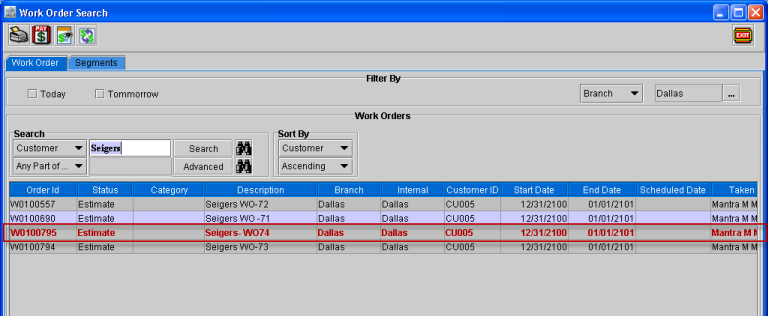
In the Work Order search window, the work orders having authorized limit exceeded segment lines will be displayed in a different color (as shown below).
Figure 1.5
-
From within the Work Search Order window, you will be able to open the work order of which segment lines have exceeded the Authorized Limit and therefore take appropriate actions to solve Authorized Limit discrepancy.
Scenario based Illustration
Scenario 1:
Credit limit is present for the order customer and Authorization Limit is exceeded for the segments.
-
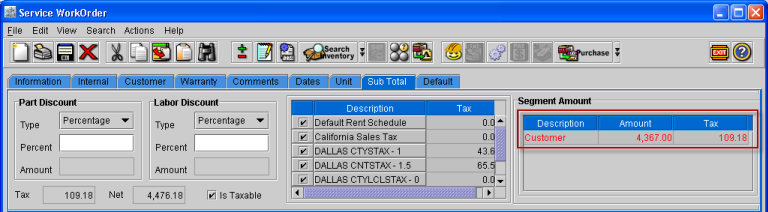
On saving the order, system will display the Work Order ID (In Information Tab) as well as the Segment total (In Sub Total Tab) in Red color.
Figure 1.6 Work Order ID displayed in Red Color
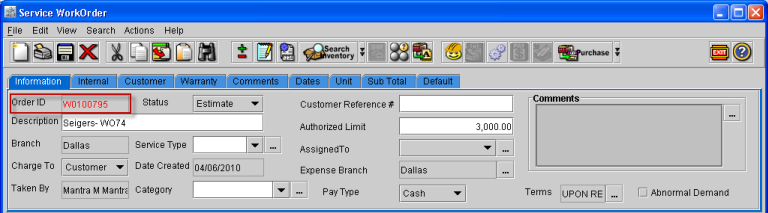
Figure 1.7 Segment Total Amount displayed in Red Color
-
On exiting the order, system will display the message (as shown fig 1.4) notifying the exceeding of Authorization Limit.
-
In the Work Order search window, the Work Order having Authorization Limit exceeded for segment lines will be displayed in different color (as shown in Figure 1.5)
Scenario 2
Authorization limit is not exceeded and Credit Limit is exceeded for the Order Customer
-
If credit limit for the order customer is exceeded, then system will display the message as shown in Figure 2.0.
Figure 2.0
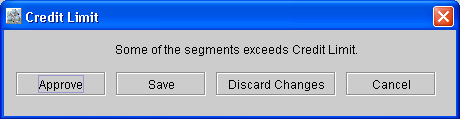
You will be able to approve credit limit for the order by selecting the Approve button present in the Message window. For more information on Approving Credit Limit read Approve Credit Limit.
Scenario 3
Authorization limit is exceeded for the segment and Credit Limit is also exceeded for the Order Customer
For the Work Orders having Authorization Limit as well as Credit Limit also exceeded, system will first consider the Authorization Limit validation. Once the Authorization Limit is resolved, system will consider Credit Limit validation.
-
On saving the order, system will display the Work Order ID (In Information Tab) as well as the Segment total (In Sub Total Tab) in Red color.
-
On exiting the order, system will display the message (as shown below) notifying the exceeding of Authorization Limit.
-
In the Work Order search window, the Work Order having Authorization Limit exceeded for segment lines will be displayed in different color
-
Once the Authorization Limit discrepancy is resolved, and then on saving and exiting the order, system will display message notifying exceeding of credit limit.