
Recount Sheet Print
Reference No: 22646
(V 02.00.03-00)
Details
In Physical Inventory Module, you can generate the Recount Sheet Report from within Discrepancy window, which will display the non-adjusted physical Inventory lines which are having difference in On hand quantity and Count.
Steps to generate Recount Sheet Print
Access Physical Inventory Module.
Invoke Discrepancy window of Physical Inventory batch for which print has to be generated.
Click on Print Recount Sheet Icon

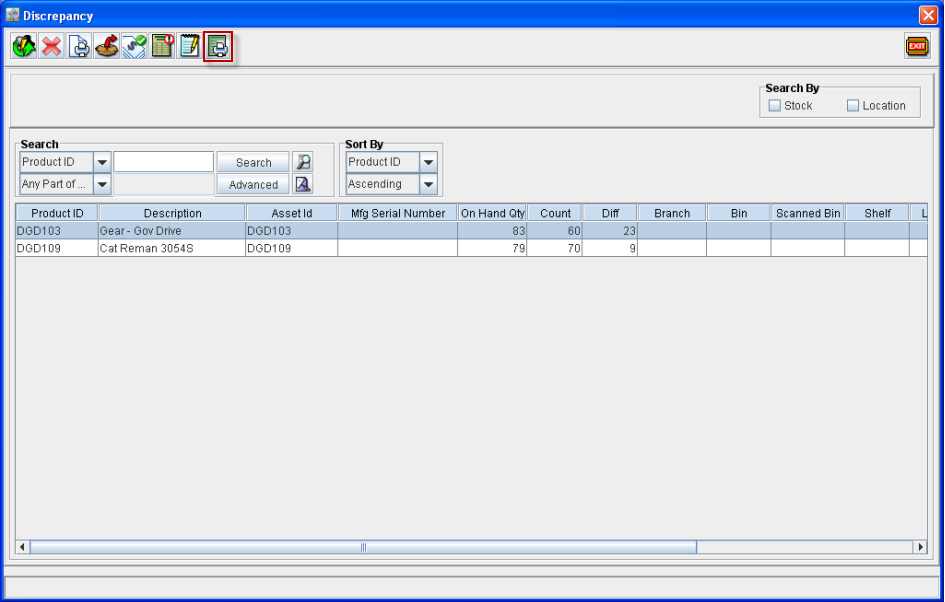
System displays the Print Recount Sheets dialog as shown below :
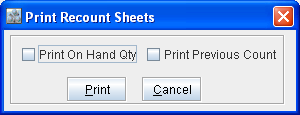
Select the option Print On Hand Qty, if On hand Qty has to be displayed in the print generated.
Select the option Print Previous Count, if value entered for Count to be displayed in the print generated.
Click on Print Icon .
Report Sample
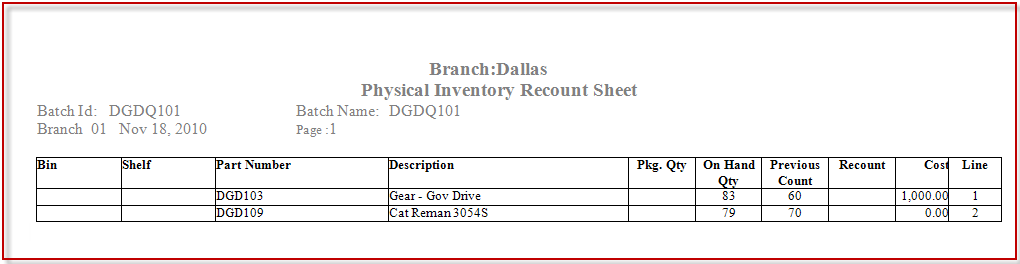
Recount Sheet Report Fields Information
Field | Description |
Bin | Bin Number of the Part |
Shelf | Shelf Number of the Part |
Part Number | Unique ID of the Part |
Description | Part Description |
Pkg.Qty | Package Quantity for the Part in Part Edit window. |
On Hand Qty | Current Stock of the Part |
Previous Count | Count value entered for the Part |
Recount | <blank> Note : This field will be displayed as blank, to facilitate manual entry of values. |
Cost | Cost of the Part as displayed in physical inventory record. |
Line | Line number |