Exporting Qty Adjustments
Reference : 20120 99MA214784
(V 01.00.93-00)
Support for exporting Qty Adjustments to a folder that is pre- defined in Defaults module
Details
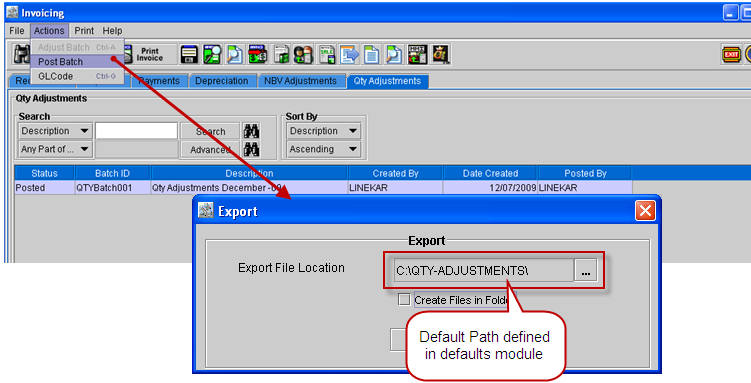
Support has been now provided for the user to pre-define the default folder path in Defaults Module, which will be displayed in the export dialog displayed while posting the Qty Adjustments batch.
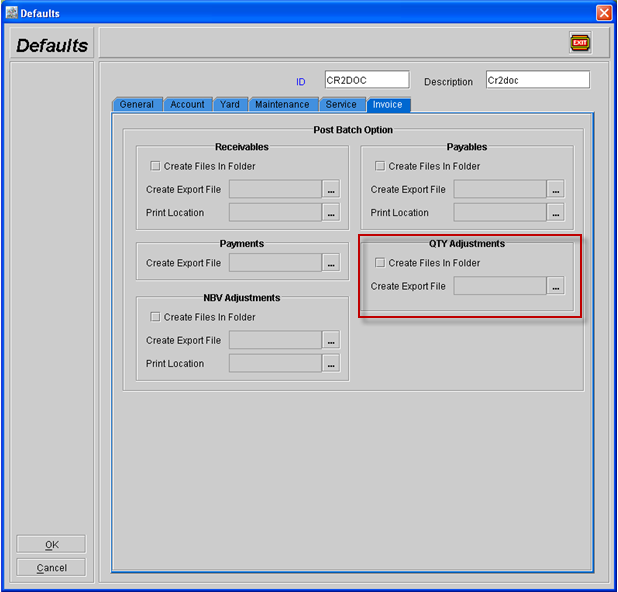
In the Defaults Module g Invoice Tab , new options has been added as shown below, using which user can select a default path as well as set the selection status for the option, "Create Files In Folder".
To set a default path, click on the importable button present in the Create Export File to display the "Select Path" window, where in you can locate and select a path.
Figure 1.0
If any path is set as default path for QTY Adjustments in defaults module, then on posting a Qty Adjustments batch, the selected path will be displayed as shown in Figure 1.1.
Figure 1.1