
Calculation of Average Cost
Reference: 19084
(V 01.00.85-04)
Functionality
Now, the Average Cost of a Part/Non-serial item will be calculated based on the Vouchered Cost of the Received line (if any vouchered quantity present) or the Received Cost of the Part/Non-serial item currently (On Hand) in Stock.
It will be calculated as:
Average Cost of Part = Total Cost of the item in stock (On Hand Quantity)/Total quantity in stock.

Here, Vouchered Cost will be considered as Total Cost, if the Received line is Vouchered.
If Received Line is not Vouchered then, the Cost on the Received line will be considered.
If a single item/Part on the Received line is Vouchered, then the same Cost will be considered for all other items or parts in the Received line.
For example, if 10 items were received for a cost of 10 each, Total Received Cost will be calculated as 100. Out of the 10 items received 1 was vouchered and the Vouchered Cost is 15, then the Vouchered Cost for the remaining 9 items will be considered as 15* 9 while calculating Average Cost. As the remaining quantity cannot be Vouchered for a different Cost.
While considering stock, system will always consider the stock/ Quantity currently on hand and not the Quantity received.
For implementation of this feature the following changes have been incorporated:
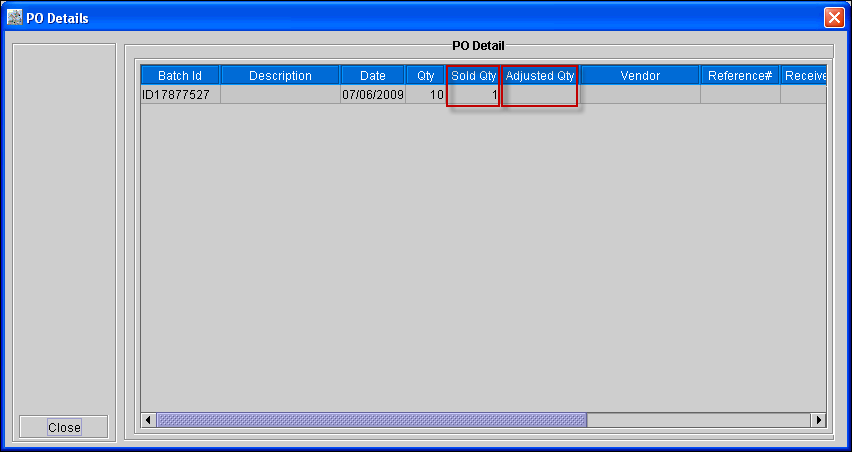
Two new columns 'Sold Qty' and 'Adjusted Qty' has been now added in the PO Details window invoked by clicking on Parts Edit Window > PO Info where the sold quantity and the adjusted quantity will be reflected as shown in Figure 1.0. The Adjusted Quantity will reflect, all the adjusted Quantities, affecting the stock, that is: Physical Inventory Adjustment, Retired Quantity, Damaged Quantity.
Figure 1.0
The field Average Cost is disabled in Part Edit window.
Scenarios where Average Cost will be Affected (Re-calculated)
Parts Sale Order: If the Receive Line of the Sold Part has Vouchered Cost, that cost will be reduced from Total Cost. Else Receive Line Cost will be reduced.
Return to Manufacturer: If the Receive Line of the Part has Vouchered Cost, that cost will be reduced from Total Cost. Else Receive Line Cost will be reduced.
Physical Inventory Adjustment:
For reducing the stock, if the Receive Line of the Part has Vouchered Cost, that cost will be reduced from Total Cost. Else Receive Line Cost will be reduced.
On increasing the stock, newly created Receive Line Cost will be used to update the Total Cost. (Replacement Cost is used to create new Receive line).
Posting of Voucher: On posting Vouchers, difference in Receive Line Cost and Vouchered Cost will be multiplied with available stock in the Receive line and will be added / subtracted accordingly. This is done only for the first voucher posting. Quantity being vouchered will not matter because once voucher is posted, the remaining quantity can be posted with the same price.
Parts Sale Return: On Return of Sold Part, corresponding Receive line Vouchered Cost will be added to the Total Cost. If vouchered cost is blank/zero, Receive line cost will be considered.
Transfer Order:
On transferring Parts,the Average Cost of the transferred part in the T-Out site will be calculated based on the receive line cost which is transferred to the other site. If the transferred line is vouchered, system will consider the Vouchered Cost and if the line is not Vouchered, then it will consider the receive line cost.
On transferring Parts,the Average Cost of the transferred part in the T-In site will be calculated based on the received line cost which is transferred from an other site. If the transferred line is vouchered, system will consider the Vouchered Cost and if the line is not Vouchered, then it will consider the receive line cost.
Return cores: On receiving the Return Core, the Average Cost of the received line will be affected as per the price for which it is received.