
Reference No: 25383
(V 02.00.16-00)
Details
Support has been provided to un-apply the Asset Cost to the Assets which are tagged to the Misc. Charges and for whom Asset Cost is applied. The support has been provided by adding the UnApply Asset Cost icon in the Equipment Sales Order and Purchase Order windows.
Figure 1.0 UnApply Asset Cost Icon
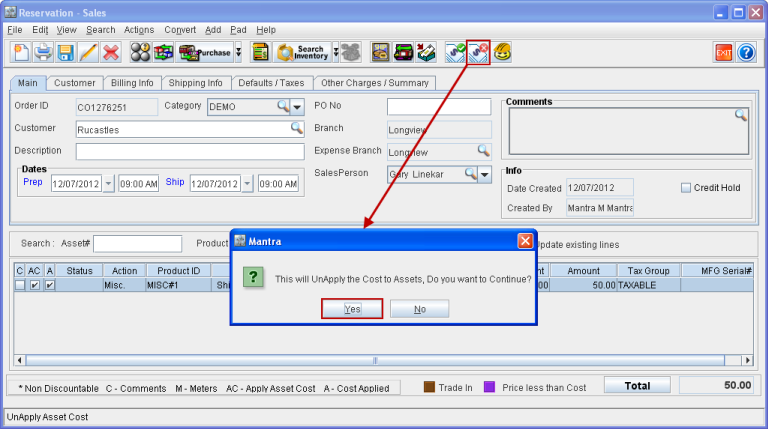
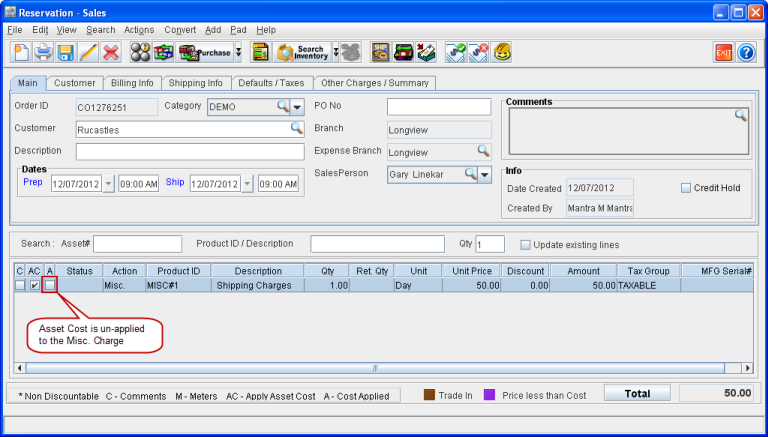
Asset cost can be unapplied by selecting the Applied cost line and clicking on the UnApply Asset Cost icon. Then the A (Cost-Applied) check box will be cleared, as shown in Figure 1.1.
Figure 1.1 Asset Cost Un-Applied
Points to Note:
-
The UnApply Asset Cost icon will be disabled and will not be enabled even if the Sales Order Invoice is canceled.
-
The system will not allow to un-apply asset cost in the following scenarios:
-
If the Purchase Order line is vouchered.
-
If the Equipment Sale Order line is invoiced and posted with a batch.