Reference No: 25484
(V 02.00.16-00)
CID to Print Manufacturer Details in Description Field
Details
In CR2, while printing any type of Orders/Quotes/Contracts/Invoices support has been provided to print the Description field, which includes the details of the manufacturer of the Item/Part along with the description of the Item/Part. The support has been provided by using CID 10003 in the UI files used for the print.
However, the existing CIDs can be used to print the description of the Item/Part in the Description field of Orders/Quotes/Contracts/Invoices prints. The details of the UI file name, existing CIDs and new CIDs of the Orders/Quotes/Contracts/Invoices are given below in Table 1.0.
The Component Type as "64" will print the manufacturer's asset serial number (S/N :) of the asset in a new line in the Description field of the Order prints. However, if you do not want to print manufacturer's asset serial number (S/N :) in new line, the Component Type as "2" should be used instead.
Table 1.0 Details of UI File Names and CID Names
|
Type of Print |
UI File Name |
Existing CID Name |
New CID Name |
|
Sales Order/ Sales Quote/ Rental Order/ Rental Quote/ Rental Contract/ Part Sales Order/ Part Sales Quote |
153500ui
|
502
|
10003 |
|
Sales Invoice/ Rental Invoice/ Part Sales Order Invoice |
159500ui |
505 |
10003 |
|
Work Order |
1154100ui (Grid) |
45 |
10003 |
|
Work Order Invoice |
1155100ui |
505 |
10003 |
|
XML Invoice |
179500 |
502 |
10003 |
|
Purchase Order |
2725000ui |
8 |
10003 |
|
Purchase Order Receipt |
154800ui |
3 |
10003 |
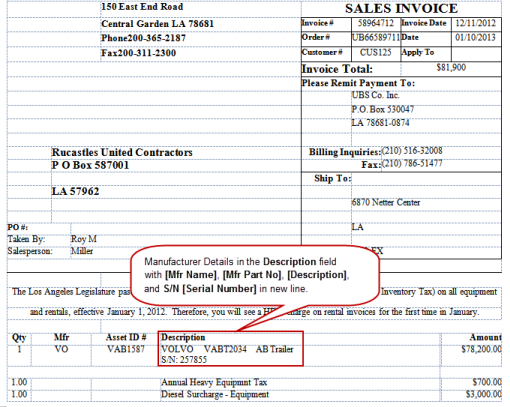
The manufacturer's details in Description field is printed with [Mfr. Name], [Mfr. Part No.], [Description], and S/N: [Serial Number] in a new line (provided Component Type as "64") for Sales Invoice, Sales Quote, Rental Invoice, Rental Quote, Rental Contract, and Rental Reservation prints. A sample Description field of a Sales Invoice print is shown in Figure 1.0.
Figure 1.0 Description Field Including Manufacturer's Details
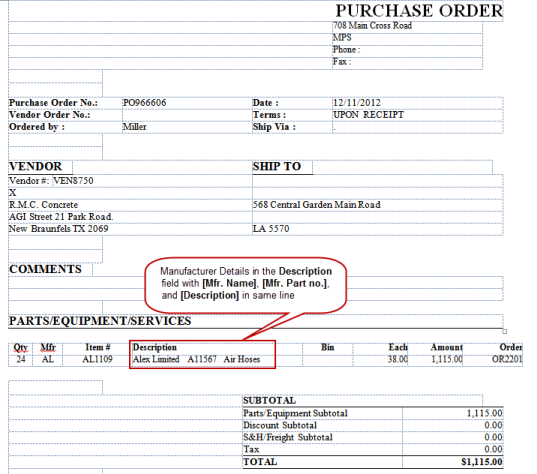
However, the manufacturer's asset serial number (S/N:), will not be printed in Work Orders, Work Order Invoice, Purchase Order, Purchase Receipts, Parts Sales Invoice and Parts Sales Quote. A sample Description field of a Purchase Order print is shown in Figure 2.0.
Figure 2.0 Description Field Including Manufacturer's Details in a Purchase Order