
Reference No: 24005
(V 02.00.07-00)
Details
In CR2, you will now be able to give Credit Memos towards amount charged for Meters.
Giving Credit Memo for Meters Charged
-
Create a Rental Order in CR2 with metered Item(s) added to it.
-
Provide meter Read-Out values and Invoice the Rental Order.
-
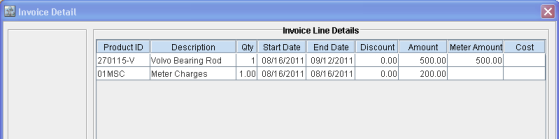
Charge for the Meter(s) and Post the Invoice, as shown in Fig 1.0 below.
Fig 1.0
-
Open the Order > View > Invoices
-
Select the Posted Invoice > Click on the Credit Memo icon to open up the Credit Memo window, as shown in Fig 2.0 below, and thus create a credit memo.
Fig 2.0
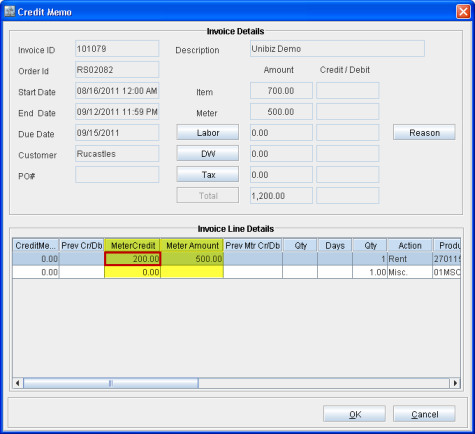
The Credit Memo window has two additional columns named as:
-
Meter Amount - Displays the amount that was charged in the invoice based on meter readings.
-
Meter Credit - This is an editable field where you can enter the amount that needs to be credited back from the amount charged based on meter readings. This can be equal to or less than the value in the Meter Amount field.
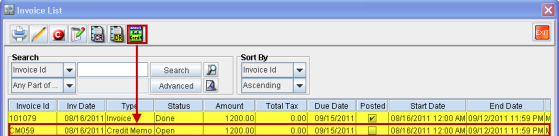
Note: Click on Full Credit icon to create a Credit Memo for the whole Invoice amount including the Meter charges, as shown in Fig 3.0 below.
Fig 3.0
A Credit Memo for Meter Charges has been successfully created.