
Reference: 22347
(V 02.00.03-00)
|
Item |
Hard-coded value |
|
Parts |
PART |
|
Labor |
LABOR |
|
Misc. |
MISC |
|
Assets |
EQUIP |
|
Equipment (non-serial) |
ITEM |
While printing an invoice in Lanvera XML format having items (Parts, Labor, Misc, Assets, Equipment, Kits), before using the standard Hard-coded logic to print the Type value for the item in the XML print, system will verify if any Commission Group is tagged in Commission field of respective item edit window. If a Commission Group is tagged in Commission field, system will use the tagged Commission Group to print the Type value of the item. The Group ID of the Commission Group which is tagged will be printed as Type value for the item in the XML print.
In Commission Group window as shown in Figure 1.0 below, which is invoked by clicking the import button present in the Commission field under Groups category of the item (Parts, Labor, Misc, Assets, Equipment, Kits) edit window, you can Add/Edit/Delete Commission Groups.
Figure 1.0
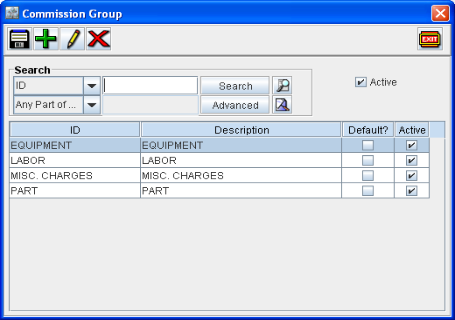
For example, An item [ITEM-A] for which the Type value is printed as ITEM can instead be printed as EQUIPMENT (or anything other ) by creating a Commission Group with Group ID entered as EQUIPMENT and following tagging the same Commission Group EQUIPMENT in the Commission field of item [ITEM-A] edit window.
Note: If the Commission field is set as 'Blank' in the item edit window, system will use the standard Hard-coded logic to print the Type value for the item in the XML print.