
The Return PO section will display the information regarding item(s)/asset(s)/part(s) that you have selected for returning using the Return to Vendor Order, as shown in Figure 1.5.
Figure 1.5 Return to PO Section
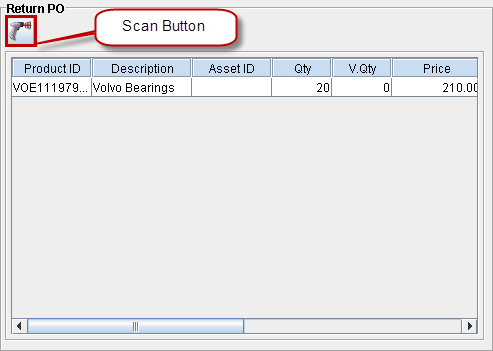
Scan Button
This button can be used to quickly scan in assets to a Return to Vendor Order. In the Return PO section, information will be displayed under the columns given in Table 1.6.
Table 1.6
|
Column Name |
Full Name |
Description |
|
Product ID |
Product ID |
ID of the Product. |
|
Description |
Product Description |
Description of the Product. |
|
Asset ID |
Asset ID |
ID of the Asset. |
|
Qty |
Quantity |
The quantity of this item/part that is returned using the Return to Vendor Order. |
|
V.Qty |
Vouchered Quantity |
The quantity of item/part that was vouchered. |
|
Price |
Price |
If the line was vouchered, then this field displays the voucher price. Else the Purchase Order price is displayed. |
|
Amount |
Amount |
Price x Quantity. |
|
Tax |
Tax |
Displays the tax as applied on the Purchase Order whose items/parts are returned using this order. |
|
Return Date |
Return Date |
The date when this item/part is returned. This by default fetches and displays the date defined in the Ret. Date field in the Information tab. Its value can be modified, if need be. |
|
PO ID |
Purchase Order ID |
Order ID of the Purchase Order through which the item/part was received. |
|
Recv. Batch ID |
Receive Batch ID |
The Batch ID in which the item/part was received on the Purchase Order. |
|
C |
Comments |
Displays whether comments are present or not. |