
Reference No: 27145
(V 02.00.20-00)
Viewing Asset Revenue and Expense Information
Details
The Asset's Revenue and Expense information can be viewed In the Asset edit window under the Asset Rev/Exp Information section in the LTD Revenue, YTD Revenue, LTD Expense and YTD Expense fields, as shown in Figure 1.0.
Figure 1.0 Asset Revenue and Expense Information
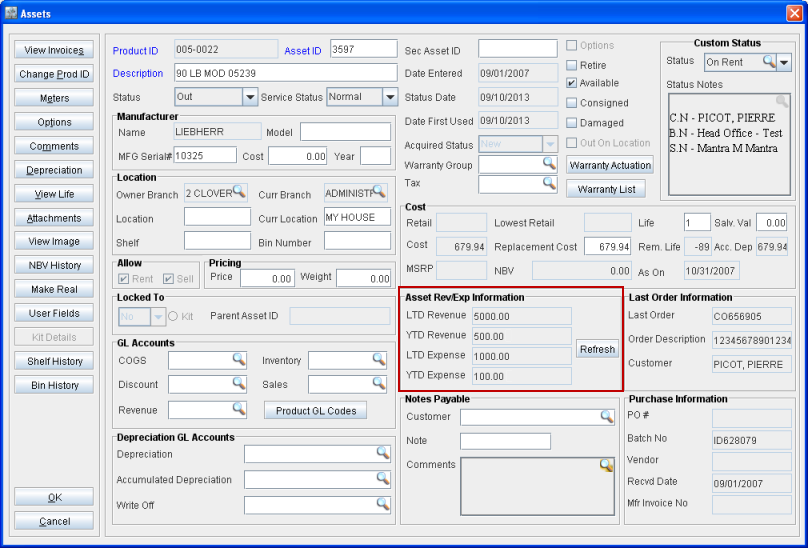
Note: On opening the Asset edit window, the values in the LTD Revenue, YTD Revenue, LTD Expense and YTD Expense fields will not display the refreshed data. Only on clicking the Refresh button, the refreshed data is displayed.
The details of the data displayed in the LTD Revenue, YTD Revenue, LTD Expense and YTD Expense fields are explained in Table 1.0.
Table 1.0 Details of LTD Revenue, YTD Revenue, LTD Expense and YTD Expense Fields
|
Field Name |
Description |
|
LTD Revenue |
Displays the Asset’s Revenue from Rental Orders from the time the Asset is acquired till date. It considers the Total Invoices, Credit Memos and Debit Memos and also the final sale of the Asset. Sale revenue is not considered. |
|
YTD Revenue |
Displays the Asset’s Revenue from Rental Orders from the start of the current calendar year till date. It considers the Total Invoices, Credit Memos and Debit Memos and also the final sale of the Asset. Sale revenue is not considered. |
|
LTD Expense |
Displays the expenses incurred for the Asset from the time the Asset is acquired till date. It considers the total amount of Work Order Invoices except "Capitalized Repairs" and "Make Ready" Work Orders. Will stop accumulating the expenses once the asset has been sold. Will stop accumulating the expenses once the asset has been sold. Even after the asset is sold, it can be added to the Work Order. |
|
YTD Expense |
Displays the expenses incurred for the Asset from the start of the current calendar year till date. It considers the total amount of Work Order Invoices except "Capitalized Repairs" and "Make Ready" Work Orders. Will stop accumulating the expenses once the asset has been sold. Even after the asset is sold, it can be added to the Work Order. |